Showing posts with label security. Show all posts

Sunday, February 9, 2014

Will Satya Nadella Save the Internet on April 8th 2014?

If you have worked for Microsoft, or any huge company, this will be no surprise; Microsoft has many groups working against each other or at least spending dollars in one department that could save or make millions in another. It’s not easy to align everything in a large company, especially when it has been run by the worst CEO in America for so long. Microsoft is regularly in the news “shutting down botnetsand doing other great pro-bono work to make the web safer.  I applaud this!

Yet, in the core operating systems orgs, they have let Windows XP, still the second most used desktop OS, lag behind in security and will stop issuing patches in April of 2014.  There is nothing wrong with XP, even the MS page on its retirement makes it clear that they don’t have to support it, by law, so they won’t.  There are no claims related to it not being good or safe.  I read it as, “There is no money in it for us, so we will spend the resources in a money making area”.  If you add no context, this is a totally rational business decision.  I won’t pretend to have all the data on the financial and opportunity costs of patching XP and enhancing it.  I have no idea how much money it costs Microsoft to fund the groups that take down botnets.  I also don’t know who the users of XP are, but I expect they are those who can’t afford to upgrade.  This may be due to the cost of the OS, lack of skills to safely upgrade, or in the case of businesses, economy of scale making it very expensive.

Figure 1 All OSs on the Web

WT OSs.gif

Figure 2 Windows OS Breakdown

Web OS Trends.gif

Here is what I do know.  MS will continue to support Server 2003 until July 2015.  XP and Server 2003 are mostly built on the same code base, so patching XP isn’t a complete diversion from their business.  If MS stops patching the OS that is nearly 30% of the desktop market, XP will become the most researched and exploited OS on the web in fairly short order.  The MS team that is taking down botnets will sure have their hands full then.  Maybe MS thinks that the fear of no patches will finally get users to upgrade.  In the case of the enterprise, I would think so.  In the case of small businesses and individuals, I expect this to be a boon for little IT shops; removing viruses and selling cheap fixes like host based firewalls, more anti-virus, anti-malware, and Advanced Persistent Controls.

Considering that Microsoft has zero legal or contractual obligations to improve or maintain XP, perhaps they can write off the cost of not turning the internet into a XP infested filthy virus zone.  OK, intentional hyperbole aside, I vehemently urge Mr. Nadella to throw his predecessor under the bus and take up the cause of keeping XP healthy.  This doesn’t just mean patching; it means a few basic enhancements that are needed.

OK, when I say, “there is nothing wrong with XP”, I know, it doesn’t have Address Space Layout Randomization and User Account Control, and many other benefits of post-XP OSs.  Let’s not confuse the “need” for the next best OS for an actual need to get off a dangerous OS.  I guess XP will be that OS soon, if Mr. Nadella doesn’t reconsider.

My in-depth focus on security is mainly around applied cryptography and identity management, so I welcome other suggestions in the comments. Below is my wish list for XP enhancements. 

Upgrade to schannel.  XP does not support Server Name Indication and TLS 1.2 with AES cipher suites.  There are some patches for 2003 that add AES cipher suites, but with TLS 1.1 and below are vulnerable to BEAST attacks, as the added cipher suites use CBC mode. Make all these changes part of critical updates, not hotfixes. No one applies hotfixes unless they know about the issue.

Force stronger NTLM settings as part of a Critical Update, rather than simply issuing advisories.  Nobody reads the advisories; they apply patches and cross their fingers.

Saturday, January 11, 2014

Godaddy Asks People NOT TO USE ITS HOSTED EMAIL and May Not Even Use It Themselves

Disclaimer, Godaddy made me angry with a billing issue.  This is what caused me to look into the value I get from them.  While my language may be angry and inflammatory, the facts are not disputable.  I have informed them about their messed up SMTP TLS, but have not heard back.
Try to send a secure mail to Godaddy hosted addresses and they will return this message
Sample server certificate, do not use on production systems!
Maybe they are hosting customers’ mail on non-production systems.   For additional irony, they are hosted in the domain, secureserver.net.
farmtomarketcreations.com. 3600 IN      MX      0      smtp.secureserver.net.
farmtomarketcreations.com. 3600 IN      MX      10    mailstore1.secureserver.net.
Even more irony!!!!  Godaddy doesn’t even use their own hosting for email, they use Microsoft!
                godaddy.com.            3600    IN MX      0     godaddy-com.mail.protection.outlook.com.
OK, so this could be that they just use MSs Cloud Anti-Spam and then relay the spam free mail into their systems, but I am dubious.
A quick word about SMTP and TLS.  It is a great way to keep mail more secure because it does not require an end user to know anything or that it is even there.  It just requires mildly qualified techs to configure their mail servers correctly.  TLS, done right, will protect the message in transit from one mail system to the next. 
Back to the hosting I pay for.  While the MX records do not change for my hosting, the corresponding A records change a bit, and multiple tests against the same IP render different results, in terms of TLS support. It appears they use technologies like global traffic management, round robin DNS, and load balancers, and every host was configured by a different incompetent tech.
Their MX records for both names seem to correspond to the same 4 IPs
smtp.secureserver.net. 300     IN      A       72.167.238.201
smtp.secureserver.net. 300     IN      A       72.167.238.29
smtp.secureserver.net. 300     IN      A       68.178.213.37
smtp.secureserver.net. 300     IN      A       216.69.186.201
mailstore1.secureserver.net. 300 IN     A       68.178.213.37
mailstore1.secureserver.net. 300 IN     A       216.69.186.201
mailstore1.secureserver.net. 300 IN     A       72.167.238.201
mailstore1.secureserver.net. 300 IN     A       72.167.238.29
Here’s what CheckTLS shows me over a decent number of tests. Never a score above 68 and never once a valid SSL certificate.  Of 18 tests, 2/3rds fail to even allow TLS.
Godaddy.png

So, let’s look at the hosts that do offer up SSL/TLS certificates.   First, they send their Root certificate twice, adding to handshake time and size.  The root and SSL certs are both 1024 bit.  We already covered the clearly stated “Do not use”.   The SSL certificate is good for 10 years?  At least it is not expired.  :-P Crazy… Finally, the subject common name on the SSL certificate doesn’t match any of their server names.   I guess they can’t afford certificates… Wait, isn’t Godaddy an SSL cert provider?
Certificate 1 of 3 in chain:
Certificate:
  Data:
    Version: 3 (0x2)
    Serial Number: 2 (0x2)
    Signature Algorithm: sha1WithRSAEncryption
    Issuer:
      countryName         = US
      organizationName      = Sample, Inc.
      organizationalUnitName  = IT Team
      commonName        = CA
    Validity
      Not Before: Nov 18 14:58:26 2010 GMT
      Not After : Nov 15 14:58:26 2020 GMT
    Subject:
      countryName         = US
      organizationName      = Sample, Inc.
      organizationalUnitName  = IT Team
      commonName        = Server
    Subject Public Key Info:
      Public Key Algorithm: rsaEncryption
        Public-Key: (1024 bit)
        Modulus:
          00:f3:89:dd:43:f0:ad:84:1a:dd:f1:fd:2c:83:bd:
          ae:01:17:d8:ab:4e:02:f4:7f:85:0a:ec:70:5e:8b:
          19:69:78:6c:61:b8:82:5b:dd:e8:ea:48:23:6b:9f:
          68:80:76:67:34:d3:94:e7:a4:54:38:bb:72:c7:ba:
          da:cc:d6:cb:f8:6b:91:53:f2:be:44:61:9c:a0:64:
          d1:02:e8:df:5b:95:7f:ae:e3:82:d1:e7:2a:96:eb:
          53:9e:17:b3:f5:d9:d1:7a:ca:dd:74:1e:97:3a:44:
          54:5d:02:54:8d:f0:7b:85:39:9f:e9:a3:f3:e7:20:
          14:1d:58:c9:f9:0d:63:fc:d3
        Exponent: 65537 (0x10001)
    X509v3 extensions:
      X509v3 Basic Constraints:
        CA:FALSE
      Netscape Comment:        
        Sample server certificate, do not use on production systems!
      Netscape Cert Type:
        SSL Server
      X509v3 Extended Key Usage:
        TLS Web Server Authentication
      X509v3 Key Usage:
        Digital Signature, Key Encipherment
  Signature Algorithm: sha1WithRSAEncryption
    38:d1:85:a8:51:8c:1b:04:a5:95:39:19:7c:6e:38:f6:e8:ef:
    27:23:40:17:11:ba:bc:7a:0c:be:39:ee:f4:2b:8d:5c:5d:dd:
    c4:ea:54:e1:d9:fd:7c:96:b2:a0:9b:67:cd:f9:06:ed:7e:02:
    8a:96:fd:f6:4d:bf:64:22:17:a5:9b:e3:33:15:7e:fe:a7:30:
    53:21:55:ba:20:c5:a6:19:50:f0:d2:44:e9:a9:1c:5a:37:20:
    cb:26:15:da:73:ba:67:29:f3:1d:f2:69:97:31:26:92:04:f9:
    6a:c3:ec:ff:6a:65:60:ef:78:54:44:7f:81:22:24:aa:e8:cd:
    fa:6b
-----BEGIN CERTIFICATE-----
MIICkTCCAfqgAwIBAgIBAjANBgkqhkiG9w0BAQUFADBDMQswCQYDVQQGEwJVUzEV
MBMGA1UEChMMU2FtcGxlLCBJbmMuMRAwDgYDVQQLEwdJVCBUZWFtMQswCQYDVQQD
EwJDQTAeFw0xMDExMTgxNDU4MjZaFw0yMDExMTUxNDU4MjZaMEcxCzAJBgNVBAYT
AlVTMRUwEwYDVQQKEwxTYW1wbGUsIEluYy4xEDAOBgNVBAsTB0lUIFRlYW0xDzAN
BgNVBAMTBlNlcnZlcjCBnzANBgkqhkiG9w0BAQEFAAOBjQAwgYkCgYEA84ndQ/Ct
hBrd8f0sg72uARfYq04C9H+FCuxwXosZaXhsYbiCW93o6kgja59ogHZnNNOU56RU
OLtyx7razNbL+GuRU/K+RGGcoGTRAujfW5V/ruOC0ecqlutTnhez9dnResrddB6X
OkRUXQJUjfB7hTmf6aPz5yAUHVjJ+Q1j/NMCAwEAAaOBkDCBjTAJBgNVHRMEAjAA
MEsGCWCGSAGG+EIBDQQ+FjxTYW1wbGUgc2VydmVyIGNlcnRpZmljYXRlLCBkbyBu
b3QgdXNlIG9uIHByb2R1Y3Rpb24gc3lzdGVtcyEwEQYJYIZIAYb4QgEBBAQDAgZA
MBMGA1UdJQQMMAoGCCsGAQUFBwMBMAsGA1UdDwQEAwIFoDANBgkqhkiG9w0BAQUF
AAOBgQA40YWoUYwbBKWVORl8bjj26O8nI0AXEbq8egy+Oe70K41cXd3E6lTh2f18
lrKgm2fN+QbtfgKKlv32Tb9kIhelm+MzFX7+pzBTIVW6IMWmGVDw0kTpqRxaNyDL
JhXac7pnKfMd8mmXMSaSBPlqw+z/amVg73hURH+BIiSq6M36aw==
-----END CERTIFICATE-----                                                                                                                                                                                                                                      
[003.724]                             
Certificate 2 of 3 in chain:
Certificate:
  Data:
    Version: 3 (0x2)
    Serial Number:
      92:69:45:90:f7:aa:ec:38
    Signature Algorithm: sha1WithRSAEncryption
    Issuer:
      countryName         = US
      organizationName      = Sample, Inc.
      organizationalUnitName  = IT Team
      commonName        = CA
    Validity
      Not Before: Nov 18 14:58:26 2010 GMT
      Not After : Nov 15 14:58:26 2020 GMT
    Subject:
      countryName         = US
      organizationName      = Sample, Inc.
      organizationalUnitName  = IT Team
      commonName        = CA
    Subject Public Key Info:
      Public Key Algorithm: rsaEncryption
        Public-Key: (1024 bit)
        Modulus:
          00:b8:ed:8e:6f:80:6c:10:56:21:16:b9:53:a9:00:
          95:b9:60:18:48:76:fd:a2:e4:b9:4c:21:03:d9:17:
          0f:f7:09:ae:31:f6:1b:ee:3f:d9:d6:fe:53:70:84:
          5b:df:63:7b:f4:a2:9d:34:4f:0e:55:33:e6:ee:a7:
          4c:b9:43:0f:70:51:71:bc:ee:50:6c:fd:4e:41:f2:
          4d:cf:9d:9c:94:a4:40:85:e9:27:74:08:78:fc:f6:
          2e:e4:a9:d5:3e:8b:27:a9:ed:52:06:45:a5:76:a4:
          2a:8d:2a:10:e9:31:6d:5a:6a:75:34:10:4c:85:9a:
          5d:4d:43:3a:24:59:95:29:7f
        Exponent: 65537 (0x10001)
    X509v3 extensions:
      X509v3 Basic Constraints:
        CA:TRUE
  Signature Algorithm: sha1WithRSAEncryption
    a0:04:32:10:92:46:dd:bd:e4:c2:71:0a:b2:d5:5c:9c:1c:8c:
    57:fa:3a:17:ed:aa:d9:28:09:f3:79:3b:18:d0:4d:e0:f8:6c:
    96:a4:b0:52:f9:8a:cd:bc:cf:1c:79:2a:6e:97:4a:89:4e:bb:
    f9:9b:0c:4c:e0:fe:a1:0f:53:7d:6b:04:3b:9b:05:1b:b7:37:
    13:ae:9d:02:58:14:7f:cc:d5:be:26:55:4e:02:15:bb:ec:9f:
    7d:b6:5e:fa:ea:c8:88:b1:b6:57:62:69:ba:c2:b1:d2:2f:a7:
    99:24:90:eb:52:a5:58:20:22:83:33:2c:37:64:84:0e:e9:46:
    90:53
-----BEGIN CERTIFICATE-----
MIICFDCCAX2gAwIBAgIJAJJpRZD3quw4MA0GCSqGSIb3DQEBBQUAMEMxCzAJBgNV
BAYTAlVTMRUwEwYDVQQKEwxTYW1wbGUsIEluYy4xEDAOBgNVBAsTB0lUIFRlYW0x
CzAJBgNVBAMTAkNBMB4XDTEwMTExODE0NTgyNloXDTIwMTExNTE0NTgyNlowQzEL
MAkGA1UEBhMCVVMxFTATBgNVBAoTDFNhbXBsZSwgSW5jLjEQMA4GA1UECxMHSVQg
VGVhbTELMAkGA1UEAxMCQ0EwgZ8wDQYJKoZIhvcNAQEBBQADgY0AMIGJAoGBALjt
jm+AbBBWIRa5U6kAlblgGEh2/aLkuUwhA9kXD/cJrjH2G+4/2db+U3CEW99je/Si
nTRPDlUz5u6nTLlDD3BRcbzuUGz9TkHyTc+dnJSkQIXpJ3QIePz2LuSp1T6LJ6nt
UgZFpXakKo0qEOkxbVpqdTQQTIWaXU1DOiRZlSl/AgMBAAGjEDAOMAwGA1UdEwQF
MAMBAf8wDQYJKoZIhvcNAQEFBQADgYEAoAQyEJJG3b3kwnEKstVcnByMV/o6F+2q
2SgJ83k7GNBN4PhslqSwUvmKzbzPHHkqbpdKiU67+ZsMTOD+oQ9TfWsEO5sFG7c3
E66dAlgUf8zVviZVTgIVu+yffbZe+urIiLG2V2JpusKx0i+nmSSQ61KlWCAigzMs
N2SEDulGkFM=
-----END CERTIFICATE-----                                                                                                                                                                                                                                                                                                                                                                                          
[003.768]                             
Certificate 3 of 3 in chain:
Certificate:
  Data:
    Version: 3 (0x2)
    Serial Number:
      92:69:45:90:f7:aa:ec:38
    Signature Algorithm: sha1WithRSAEncryption
    Issuer:
      countryName         = US
      organizationName      = Sample, Inc.
      organizationalUnitName  = IT Team
      commonName        = CA
    Validity
      Not Before: Nov 18 14:58:26 2010 GMT
      Not After : Nov 15 14:58:26 2020 GMT
    Subject:
      countryName         = US
      organizationName      = Sample, Inc.
      organizationalUnitName  = IT Team
      commonName        = CA
    Subject Public Key Info:
      Public Key Algorithm: rsaEncryption
        Public-Key: (1024 bit)
        Modulus:
          00:b8:ed:8e:6f:80:6c:10:56:21:16:b9:53:a9:00:
          95:b9:60:18:48:76:fd:a2:e4:b9:4c:21:03:d9:17:
          0f:f7:09:ae:31:f6:1b:ee:3f:d9:d6:fe:53:70:84:
          5b:df:63:7b:f4:a2:9d:34:4f:0e:55:33:e6:ee:a7:
          4c:b9:43:0f:70:51:71:bc:ee:50:6c:fd:4e:41:f2:
          4d:cf:9d:9c:94:a4:40:85:e9:27:74:08:78:fc:f6:
          2e:e4:a9:d5:3e:8b:27:a9:ed:52:06:45:a5:76:a4:
          2a:8d:2a:10:e9:31:6d:5a:6a:75:34:10:4c:85:9a:
          5d:4d:43:3a:24:59:95:29:7f
        Exponent: 65537 (0x10001)
    X509v3 extensions:
      X509v3 Basic Constraints:
        CA:TRUE
  Signature Algorithm: sha1WithRSAEncryption
    a0:04:32:10:92:46:dd:bd:e4:c2:71:0a:b2:d5:5c:9c:1c:8c:
    57:fa:3a:17:ed:aa:d9:28:09:f3:79:3b:18:d0:4d:e0:f8:6c:
    96:a4:b0:52:f9:8a:cd:bc:cf:1c:79:2a:6e:97:4a:89:4e:bb:
    f9:9b:0c:4c:e0:fe:a1:0f:53:7d:6b:04:3b:9b:05:1b:b7:37:
    13:ae:9d:02:58:14:7f:cc:d5:be:26:55:4e:02:15:bb:ec:9f:
    7d:b6:5e:fa:ea:c8:88:b1:b6:57:62:69:ba:c2:b1:d2:2f:a7:
    99:24:90:eb:52:a5:58:20:22:83:33:2c:37:64:84:0e:e9:46:
    90:53
-----BEGIN CERTIFICATE-----
MIICFDCCAX2gAwIBAgIJAJJpRZD3quw4MA0GCSqGSIb3DQEBBQUAMEMxCzAJBgNV
BAYTAlVTMRUwEwYDVQQKEwxTYW1wbGUsIEluYy4xEDAOBgNVBAsTB0lUIFRlYW0x
CzAJBgNVBAMTAkNBMB4XDTEwMTExODE0NTgyNloXDTIwMTExNTE0NTgyNlowQzEL
MAkGA1UEBhMCVVMxFTATBgNVBAoTDFNhbXBsZSwgSW5jLjEQMA4GA1UECxMHSVQg
VGVhbTELMAkGA1UEAxMCQ0EwgZ8wDQYJKoZIhvcNAQEBBQADgY0AMIGJAoGBALjt
jm+AbBBWIRa5U6kAlblgGEh2/aLkuUwhA9kXD/cJrjH2G+4/2db+U3CEW99je/Si
nTRPDlUz5u6nTLlDD3BRcbzuUGz9TkHyTc+dnJSkQIXpJ3QIePz2LuSp1T6LJ6nt
UgZFpXakKo0qEOkxbVpqdTQQTIWaXU1DOiRZlSl/AgMBAAGjEDAOMAwGA1UdEwQF
MAMBAf8wDQYJKoZIhvcNAQEFBQADgYEAoAQyEJJG3b3kwnEKstVcnByMV/o6F+2q
2SgJ83k7GNBN4PhslqSwUvmKzbzPHHkqbpdKiU67+ZsMTOD+oQ9TfWsEO5sFG7c3
E66dAlgUf8zVviZVTgIVu+yffbZe+urIiLG2V2JpusKx0i+nmSSQ61KlWCAigzMs
N2SEDulGkFM=
-----END CERTIFICATE-----  

-->

Friday, January 4, 2013

Rehashing Pass the Hash

The first question one might ask is, “Really…  Why are you writing about this old news now?”  The answer is simple; even with the release of Window 8 and Server 2012, Pass the Hash (PTH) attacks are still incredibly simple and effective.  While from an academic standpoint passing the hash is simple to understand, it is a bit more complex from an attacker or defender’s stand point.  The reason for this post is that having read a huge number of papers and post on pass the hash, none of them gave me a clear picture.   

The reason pass the hash is so powerful is due to NTLM’s initial design flaw.  NTLM was essentially broken from the day it was released.  While UNIX started saving salted hashes in the 1970s, the designers of NTLM chose to use an unsalted hash.  Salting a hash is probably the most important design criterion when designing an authentication system.

A hash is a one way transformation of a variable input to a fixed length output.  A hash function must be deterministic, meaning that the same input will always generate the same output, no matter what platform it might be run on. Another key property of a good hash function is that even a small change in the input creates a significant change in the output.  The final vital property of a hash function is that it must be truly one way.  There must be no method allowing the input to be derived using only the output.

With these properties, and the benefit of hindsight, a hash is the perfect way to for one party to prove they know a password without the other party actually knowing it.   Storing reversible or god forbid plaintext passwords introduces a significant number or risks.  Only the ignorant do this.

If the hash can’t be reversed, then you might think there are no more risks and you can just hash those passwords and be on your merry way.  If we didn’t have a security model to think about, this might make sense.   The reason we bother to hash the passwords and not store them as plaintext on our authentication servers is that, on the off chance that the auth server is compromised, we want to minimize the value of the stolen identities.  Assuming you kick out the attacker and restore from backup, it would be nice to not have to force all of your users to change their passwords.  It would be nice to be sure that the breach wasn’t just a foothold to a larger attack. Additionally, as users tend to reuse passwords, we don’t want to put the users’ accounts at risk on other systems or sites.  This brings us to the risk created by just storing the password hash with no salt.  If one has access to the hash and wants to derive the input (password), all that needs to be done is test passwords until the outputs (hashes) match.  This Brute force method is always a theoretical option when trying to defeat a cryptographic function.  Trying all possible passwords is time consuming, which works against the attacker.  Unfortunately, with super fast processors and huge amounts of cheap storage, it is now possible to pre-compute and store huge numbers of hashes and the corresponding passwords.  In the space of less than 1 TB, you can store tables that cover 96% of 1 to 9 character passwords containing upper case, lower case, and numbers.  By storing just the password hash we make it completely worth an attacker’s time to create and save the pre-computes values.  Even better, you can just pay when you need to use someone else’s’ tables.

Simply salting the hash wastes all that work the attacker did to pre-compute the hashes.  Salting a hash is simply adding random or pseudo-random data to the input before computing the hash.  The salt is saved and later used when verifying the password.  When verifying the password, the salt is looked up, re-applied to the password that is being tested, and the data hashed.  If the result on file and the real-time computed result match, the password was correct. By applying the random data, we have completely wasted the attackers’ pre-computation effort.  Ideally, every account uses a different salt, so that even if your user database is taken, every password must be brute forced separately. 

Salted Hash Example

Password    Salt  SHA-1 Hash

V3ryStrong  1     88 93 EB 7A 28 DA A4 95 89 B1 B5 A1 E0 C6 A0 83 9D 38 A3 39

V3ryStrong  2     59 86 41 B2 62 B7 C3 C7 54 27 78 94 FB D6 59 24 5F 77 74 40


The example is purposely weak to make for easy understanding.  Usually the salt would be 8 – 16 bytes. It shows the amplification provided by SHA-1.  With a single bit change the data is completely different and we see that there is no way to pre-compute all passwords, unless we pre-compute all passwords with all possible salt values, which in not feasible.   

While this is fun background data, it really has little to do with passing the hash, as PTH lets an attacker who has the hash assume the user’s identity without ever knowing the password.  This is because windows stores the user’s NT hash in Active Directory DIT or the SAM.  The first step of NTLM and NTLMv2 handshakes is that the system converts the user’s password to the NT hash, and the handshake does some fun handshake math that proves the user knew the hash, without the hash ever crossing the network. 

This system makes the hash “password equivalent”.  If an attacker has the user’s hash, they just skip the “convert password to NT hash” and go straight to using it in the handshake.   There are many tools for doing this, depending on where NTLM is being used. NTLM authentication occurs in-band with the protocol that is being used to access data or access a system.  NTLM auth occurs inside remote file access via CIFS/SMB, TDS for accessing SQL server, RPC for all sorts or remote administration and access, HTTP for web auth, and I’m sure a few more things. 

In order for an attacker to pass the hash, they need four things:

1.       The valid NT hash (and username)

2.       A channel to pass the hash through

3.       A server hosting a service that utilizes/allows NTLM auth

4.       A client (or tool) that allows the attacker to input the hash rather than the password

In a world where all four elements are available to an attacker, there is no stopping PTH.  Keeping in mind the four requirements, defenders can limit, and more importantly, and understand their level of exposure. 

Securing the Hash

The most important thing a defender can do is keep the hash from falling into the wrong hands.  The hash resides on a computer in two main areas; the SAM (Security Account Manager) db and in RAM, for users that are logged in.  There is a common misconception that the NT hash is also stored in the registry for cached logon of domain user accounts on domain joined computers.  This is just that, a misconception. Depending on system settings, data is stored that allows a domain user to logon to a machine when no domain controller is available; however this data is an MD4 of the NT hash + username.  It might be worth an attackers’ time to pre-compute the hashes for common user names, such as ‘Administrator’. 

Looking at the threat model, one can conclude that the horse is out of the barn if the hash is stolen.  In order to steal the hash, the attacker had to gain full control of the system.  The attacker must either execute hash stealing code as a member of local administrators, or gain physical access to the poorly protected computer.  While the horse is indeed out of the barn on that host, the attacker should be able to go no further.  At least that is the defenders hope. This is, of course, not the case.  If the user has the other three required elements, she can act as the user at will. 

Stealing the Hash from RAM

In order for an attacker to steal a user’s NT hash from RAM, the attacker must run code with administrator rights.  As with all the advice that will be offered, all the controls are fairly standard and map to basic security concepts.

·         Reduce surface area

o   Don’t leave sessions logged in unnecessarily, as another administrator’s failure can compromise your account.

o   Avoid logging in with administrator rights.  If you screw up and run attackers code, they can’t steal the hash if you aren’t an admin.

·         Use up to date AV software

Stealing the Hash via Physical Access

We all know that if an attacker has physical access to a host then they own the host.  The last thing we want to do is allow the attacker to use that host as a foothold to even more systems and data.  In the case of PTH attacks, we probably have good news here.  The NT hashes are stored in the local SAM. If the computers are not domain joined, the username and password usually don’t cross hosts, unless you took the time to sync up your usernames and passwords across them all.  As I mentioned earlier, the cached domain credentials DO NOT contain the NT hash. This means the SAM from one computer is of no value on anther.  

The one place where there IS a great deal of risk is in an enterprise, where standardization probably means that the local admin password is the same across every domain member.   This means that the compromise of any one server is equivalent to the compromise of every server.  This means that that dev server that you left up running PHP 1.2 can be a great foothold to the rest of your servers and data.

To reduce this risk:

·         Use full disk encryption that requires a token or Password Based Key Derivation Function

·         Enable syskey protection > 1.

o   This requires a password or floppy to boot and decrypt the goodies in the SAM.

o   This scales poorly for an enterprise.

·         Make sure all local admin passwords are different.

Stealing the Hash from the Network

The NTLM and NTLMv2 handshakes assure that the NT hash itself can be verified, without it ever appearing on the network.  There is nothing to see here.

If an attacker were to figure out a way to get the hash from the network, it would be an impressive feat.

Securing the Channels

If the attacker steals the hash, but has no path to pass it over, then the hash is of little value.  One nice thing about NTLM auth is that it occurs in band with the protocol utilizing it, so as a defender, you can better understand and limit your exposure.  If you block ports 80, 138,139, and 445, but open 1433, you know that the stolen hash can only be used to access SQL data but not remote file access or websites.

Controls to consider:

·         Reduce Surface Area. Only open the ports you need.  Duh…

·         Authenticate end points with VPN or IPSec.

Stop using NTLM

This one is not so simple.  One can “kerberize” all sorts of servers.  That is, allow them to utilize Kerberos authentication rather than NTLM.  Microsoft has done a pretty good job kerberizing applications, but in almost all cases, if Kerberos fails, the app will allow fallback to NTLM.

I know of no options for a defender here.  This section is really a call to MS, and others, to allow for more granular options related to NTLM auth, Kerberos, and fallback options.

I suppose this is an opportunity for firewall vendors as well.  It would be fairly easy to block NTLM auth and allow Kerberos on a per protocol basis.  I suspect an F5 ninja could write a crazy iRule to do it too.

Stop Clients from Allowing the use of the NT Hash

Assuming you have dealt with the firewall rules, most attackers will have no channel to pass hashes over.  The last option would be to pass from hosts inside your network.  This seems plausible, as the attacker got enough access to steal the hash.  

There are two classes of tools that let you work from the hash rather than the password.  The first are tools like WCE, which run on windows and allow an administrator to inject arbitrary usernames and hashes into a user’s session.  This allows all subsequent uses of any tool in that session to authenticate as the injected user.  This means that any Windows tool that speaks NTLM will work.  The second class are custom tools that may run on any OS and speak the protocol in question, be it SMB, TDS/SQL, RPC, or whatever, AND they speak NTLM taking a hash rather than password.

For a good list of current tools and tons of great info on PTH, see Still Passing the Hash 15 Years Later.

A good list, granted probably dated, of AV test results for detection of the tools, can be found here.

Controls to consider:

·         Make sure EVERY host inside your firewall has up to date AV.

o   Enforce this with NAC or NAP.

o   Make sure hosts with AV match up to your CMDB, such that all hosts are accounted for.

·         Consider AppLocker and Software Restriction Polices.

o   Make sure to block known tools by hash so the attacker can’t just rename at tool

o   Make sure to block known tools by name, in case the attacker makes code changes but chooses to use the same executable name.

o   Consider white listing known good apps rather than trying to blacklist known bad ones.

·         Minimize the number of local administrators.  A local admin can stop AV or add exclusions prior to copying over and loading up tools.

·         Keep up on the latest version of the tools and test your AV yourself.

Understanding Why Pass the Hash Still Works

The best way to learn this stuff is to go to Eric Glass’s NTLM page and do the math along with him.  I am borrowing heavily here to summarize for lazy.  ;-)  Well, there is a lot more great stuff on his page that you don’t need to know to understand PTH.

There are three different types of NTLM responses:

1.       NTLM Response

2.       NTLM2 Response, not to be confused with NTLMv2 Response

3.       NTLMv2 Response

NTLM Response

1.       Convert password to Unicode and apply MD4 hash.  This is the NT hash.

2.       Pad the NT hash with 0s to make it 21 bytes.

3.       Break the 21 bytes in to 3 keys of 7 bytes each.  This is 56 bits.

4.       Apply odd parity to each key.  This makes each key a valid 64 bit DES key.

5.       Encrypt the NTLM challenge (from the server) with each of the three keys.

6.       Concatenate the three encrypted values, creating the response.

7.       Send it.

As you can see, the challenge is provided by the server, and could be substituted by an attacker with network access.  This allows an attacker to create pre-computed responses (rainbow tables) for that challenge.  Obviously this is scary.

NTLM2 Response

Once again, not to be confused with the NTLMv2 Response.  This one uses nearly the same math as the NTLM Response, but let’s the client add a “client challenge” thus negating the value of an attacker substituting their own challenge.   This is used when the 0x00080000- NTLM 2 session security flag is set.

1.       Convert password to Unicode and apply MD4 hash.  This is the NT hash.

2.       Pad the NT hash with 0s to make it 21 bytes.

3.       Break the 21 bytes in to 3 keys of 7 bytes each.  This is 56 bits.

4.       Apply odd parity to each key.  This makes each key a valid 64 bit DES key.

5.       The client creates a random 8 byte client challenge.

6.       The server challenge and client challenge are concatenated and MD5 is applied, creating the challenge data.

7.       Encrypt the challenge (MD5 output) with each of the three keys.

8.       Concatenate the three encrypted values, creating the response.

9.       Send it.

NTLMv2 Response

This response is next level.  It is totally different that the first two and includes a timestamp, the domain the user belongs to, as well as target information.

1.       Convert password to Unicode and apply MD4 hash.  This is the NT hash.

2.       Concatenate the upper case Unicode username with the Unicode authentication target.

3.       Perform HMAC-MD5 on the result of step 2, using the NT hash.

4.       Construct blob, containing the Blob signature, 4 bytes of all 0s, the time in NT time format, the client challenge, another 4 bytes of all 0s, and the target information from the server Type 2 (challenge) message, and another 4 bytes of all 0s.

5.       The server challenge form the Type 2 message is concatenated to the blob from step 4.

6.       The blob from step 4 is then HMAC-MD5’d using the result of the HMAC-MD5 in step 3.

7.       The HMAC response from step 6 and the blob from 4 are concatenated and constitute the response.

8.       Send it.

Conclusion

Pass the hash attacks are alive and well and are not going away anytime soon.  Protect your systems. 

Thursday, March 15, 2012

Proper PKI Configuration for SSL/TLS Servers

Don’t Teach Bad Habits

 A large number of servers and applications are built with SSL configured incorrectly.  If your SSL is misconfigured, it is as good as no SSL.  In reality, it may be worse than no SSL, as it gives the feeling of safety where none exists.  This is most common when developers and administrators leverage a framework that they don’t fully understand. 

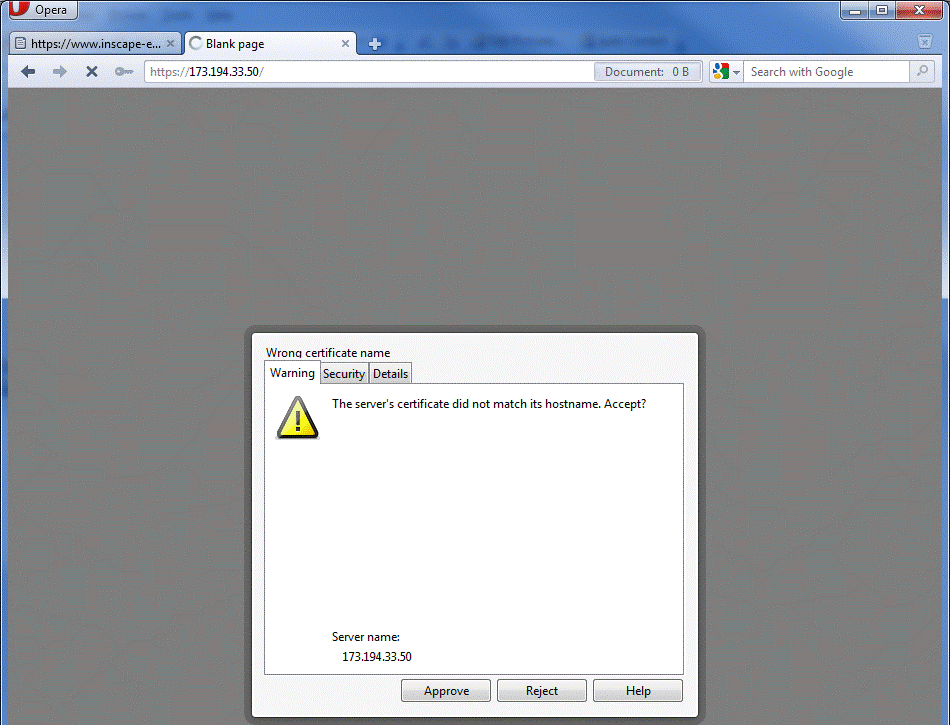
Any time a user sees one of the following errors or warnings, the server admin has failed.  A user, no matter how technical, should NEVER be forced to answer these questions.  Every time a user is trained to hit Yes, or OK to one of these errors, the user is being trained to fail.


https://blogger.googleusercontent.com/img/b/R29vZ2xl/AVvXsEjReRrTzqmwVJFFWLSb1SYAzSp8mKzlUd1q9k603ttHSvi0YNb3hBvgiGy7zTqPoJ9WCgxKgEfPO6fEmVISLxw44-iyPsIEKSdIWua8qWTxG9S9VtW9lPdp6ROfmY2Q2Pl8lo0BUMhCpGg/s640/1.gif

Figure 1 IE SSL Error


https://blogger.googleusercontent.com/img/b/R29vZ2xl/AVvXsEjNElOXZbCZQ-DUbxZ9HSgV3nrgOiPAMlF8yRf0oRAND2TiO_N1iLFkdrnDjrO1zHehTTZTiU257xNp6sMqEuX7iUlIA4ho_C2TquB9bxE-YSFzO56WcYtb-K0aany-u8xaC_mhAYkpvg4/s640/2.gif

Figure 2 Firefox SSL Error


https://blogger.googleusercontent.com/img/b/R29vZ2xl/AVvXsEjAasqUEsIoXYXzq4ST4wSFmgbfPvk-iqmJ_sBx4PysHOZODy_60d2c4sLt6TPY5hJdrYEyFytuNI1T9UkugvRvnXOgKDMPXgh0xLKIArW2Qv1HjIYeUImpVQ2erirhBJi2mG4IxIpXgxk/s640/3.gif

Figure 3 Opera SSL Error


https://blogger.googleusercontent.com/img/b/R29vZ2xl/AVvXsEg4HkknWpgZ4PVNkU30seR_p-Duatx2AcWcAJgkv7nDqFsvMe9BdoeQiDXDgyxAnlgcH7ADXtKTJc8X9Ar6EUTub4lwSi3O5LF50ljZQxYQjaAfvNl52OgjDvq9XrWbA4s_Vn1NNozBA68/s640/4.gif

Figure 4 Chrome SSL Error


Different browsers may have slightly different text for different failures, but most users will think of them as the same thing, “The place where I have to do an extra click to get to my site”.   


Who is Protecting Whom

This document only covers standard, run of the mill SSL, where the server has a certificate and the client does not.  Two way or Mutual TLS is not commonly used and not covered here.  One of the things that confuses people about SSL is that it is designed to allow the client to protect itself and provides on protection or authentication of the client for the benefit of the server.   The server operator or application owner is supposed to be giving the client everything it needs to make sure the connection is secure.  Presumably the user is going to submit some data that he or she does not want disclosed.  If you are running an application where the liability is not on the client, standard one way SSL is not enough for you.  You are assuming a risk that you have no control over and you need additional controls.  This is the case with most online banking in the US.   If the customer loses his password to an attacker, and the attacker drains the account, in many cases, the bank is liable.  There have been a few cases recently where banks have been able to successfully put the burden on the customer.

It is safe to assume that if your application is misconfigured such that the client cannot accurately verify that the connection is secure, your end user will be able to make a successful case as to why the risk should be shifted to you, despite any Terms of Service or other contract that may state otherwise. 


Help Them Help Themselves

There are many criteria that the client can use to determine if it should trust a connection to a server.  While some clients may chose to ignore some of the criteria, it is wise to do everything right, and avoid any issues.

Subject Common Name

The Subject of the certificate is a description of the entity that offers it to a client.  To those familiar with LDAP, it may look like and x.500 Distinguished Name (DN), and it is in fact referred to as a DN.  For example:

subject=/C=US/ST=California/L=Mountain View/O=Google Inc/CN=www.google.com

However, most of the DN is arbitrary and with the inclusion of E=, for email address, it has no hierarchical convention like an LDAP DN.   While some lament this inclusion, unless there really is an LDAP to look at, who cares if the data is actually hierarchical… 

There are two exceptions to the “arbitrary” nature of the subject.  First, parties may choose to check the subject for a specific value.  Cisco VPN concentrators, for instance, can check that a certain OU or L is included.

By far the most important, for SSL/TLS is the CN, or common name.  Most clients check to make sure that the CN matches the name that the client is attempting to connect to.   This may be the most common configuration error.  The reason for this is that as a web developer, you can’t control what the user enters in their address bar.  Maybe the user will type google.com or maybe they will type www.google.com, or they might try and access some named service like maps.google.com.   They may even type in an IP address.  Often two or more of the sites may be hosted on the same server at the same IP address.  To keep things nice and consistent, many web developers may redirect the connection to the pretty named site.  This is how google does it if you enter http://google.com into the address bar:

HTTP/1.1 301 Moved Permanently

Location: http://www.google.com/


While this works great with non-SSL sites, this will fail with HTTPS unless you plan correctly.  The reason that this fails is that the SSL negotiation happens BEFORE HTTP data can be passed.  You can’t have an HTTP redirect if the SSL negotiation fails.  This is the reason that many think that you cannot use host header based virtual sites with SSL.  They are wrong, you just have to know what you are doing and get the right certificate.

We have two different options, if we want a certificate to work with multiple names.


Wild Cards Certificates

One answer to the problem of name matching is to just get one certificate that can answer for all hosts in your domain.  RFC 5425 defines a wildcard that can match any host in a domain, so the subject common name *.google.com would work for www.google.com, google.com, and mail.google.com.  While some clients seem to allow the wildcard to match domains as well as hosts, the RFC forbids this, so avoid it.  For example, *.google.com should not work for www2.maps.google.com, as only the leftmost name is the host portion.  Everything to the right is domain, and the * is not supposed to figure into domain matching.  The domain here is maps.google.com.


Subject Alternate Name

The other option, especially if you are using host headers for sites that do not share the same domain name, is to use the subject alternate name or SAN.  The SAN is a list of names that can also be checked by a client.  One certificate could then be used for www.google.com and www.gmail.com.   While clients are supposed to be able to parse both the subject common name and the SAN list, some do this poorly, therefore it is wise to add the subject common name to the list of SANs as well.


Picking the Right Name

As stated above, the client will match the name it thinks it is connecting to to the names on the certificate.  In the case of a web browser, this is the name in the address or URL bar.  This means that if your site is behind a load balance, then the common name must match the DNS name that resolves to the load balancer.  The client has no idea there may be a cluster and load balancer.


https://blogger.googleusercontent.com/img/b/R29vZ2xl/AVvXsEgSLXZhn_FsMMOuU30BubV2moCOBdGjA_3epWVWbF_CFsp-YsvmsfGDHfVzekSvHz31B1nL90QEd5SMoghkSF_4b6Kab_WJyAhF2G7a6IR86eS6XCJPgtLFfCkZhkBJyB0tyAGryMAqyTk/s320/5.gif


Figure 5 Typical Web Cluster


In Figure 5, the proper common name for the certificate would be www.google.com.

In some corporate environments, users may bypass the load balancer in certain circumstances.  In this case, the certificate may need SANs or to use a wild card.


Time Validity

Certificates contain a Valid From and Valid To date.  The client will check to verify that the date of the connection attempt is between the two dates.  Don’t let your certificates expire.


Certificate Revocation List Distribution Points

Generally it is thought that only PKI operators need to be concerned with CRLs and CDPs (CRL Distribution Points).  This is not the case.  A CRL is a list of certificates that the issuing CA has determined are not to be trusted.  Not all certificates list a CRL, obviously if one does not exist, you don’t care about them.  If the client determines that the certificate it is inspecting is listed on the CRL, it should reject the connection.  The reason you should be concerned with CDPs, as an application owner, is that your clients will attempt to read them.  Different clients react differently when they fail to access the CRL.  Some clients will fail open and allow the connection and some will deny it.  If you know your clients are behind highly restrictive firewalls, you may need to make sure that they have access not just to your site, but also to the CDP.  This is a common place to fail in a B2B or corporate environment.


Basic Constraints, Key Usage, and Enhanced Key Usage

A good PKI book or web site would never lump these all together, but this is neither of those.  Each of these is a field that can describe how the certificate or the associated private key can be used.  Some clients may choose to make decisions based on these.  IE for instance will allow and SSL connection to a server with no EKUs listed, but if the EKU section is used and the server authentication usages is not listed, it will deny the connection.

If the Basic Constrains listed in the certificate of the CA that signed your SSL certificate doesn’t list it as a CA, the client should abort the connection.  This keeps someone from using a certificate and private key as if it were a CA.  In the past, vendors forgot to check this, and anyone who bought a legitimate SSL certificate could use it to sign other certificates that were otherwise cryptographically sound.

Key Usage should list Digital Signature and Key Encipherment; if Key Usage is defined without Key Encipherment the client should abort the connection.  If Key Usage is not listed, all uses are allowed.


The Chain

The server’s SSL certificate does not exist in a vacuum.  It is at the bottom of a PKI hierarchy.  Without the context of the PKI the SSL certificate is useless.  The beauty of using PKI to secure (authenticate, negotiate keys and provide integrity checks) an SSL connection is that this can be done with a relatively small number of trusted third parties.  One of the big reasons to leverage PKI is to avoid the risks and overhead of increasing the number of parties you, or your clients, have to trust. 

A quick reminder about key management; there is NO WAY to exchange key material securely, over an un-trusted network, without an out of band trust being established.  Diffie–Hellman does not provide authentication, so there is no way to know which party you are negotiating with.  RSA key pairs are useless as well, as the public key must be distributed securely in order for it to be trusted.  This is why OSs, Java, web browsers, and such have keystores as part of their distributions.  Ponder this; did the browser or java package you downloaded come over via SSL or could an attacker have poisoned the keystore in the package?

The root CA is the most important element in a PKI.  The trust it conveys is significant and makes it easy to extend trust to a huge number of parties.  In order to extend this trust, subordinate CAs can propagate that trust.  It is common for a well built PKI to be two or three tiers.


https://blogger.googleusercontent.com/img/b/R29vZ2xl/AVvXsEiCi-xe7VRSi-vx9yrZ3B5VNaLnoxdq-NI4dHubs3hLJR-vXCDx_5fbWzbqJWFzVswLIcryKeT0QJzoucXy6UXJY_ixvoNyxsi6muSUkEu3o3W74aYa3zjhwFjDkXGjfLpwiNaxEdWW35U/s640/6.gif

Figure 6 Typical 3 Tier PKI


To increase security and usability, one should never ask a client to trust a subordinate CA or SSL certificate explicitly.  Trust should always extend implicitly from the Root CA.   Any time you ask an end user to make the decision to trust a certificate, YOU HAVE FAILED.

It’s alright to configure dev and test wrong, right? NO!!  None of your testing is valid if you don’t configure your dev and test correctly.  Additionally, dev and test are your chance to make sure you fully understand how to configure your systems correctly.  In the parlance of sports, “You play how you practice”.  So don’t practice failing.   It is well worth the extra 10 minutes to get this right.

This hierarchy is built so that a security failure at a lower level can be eliminated by simply revoking a certificate and effectively pruning an entire branch of the PKI.  Figure 6 shows the chain belonging to webmail.T-Mobile.com, whereas Figure 7 shows the entire PKI.  If the A1 CA, in Figure 7, were compromised, the root could simply revoke the A1’s certificate and A1 and everything below it would no longer be trusted.  This has no negative effect on L1C or L1B or anything below them. 


https://blogger.googleusercontent.com/img/b/R29vZ2xl/AVvXsEh-tH0yXw6yRnrQe28LnESEwbtuppdgPwJoI3beMubUGLCb7cQfFC0EtJOBtUyFZSTmeUMC1rDpwjjwQ_lhg5jPtoH-ZbA60mDtu1QSxGJ4gvx5K2n17M0UZP0x1ahD6bhZVs_kBqmpYH0/s640/7.gif

Figure 7 Big PKI


This type of design reduces the overall damage that can be done by a successful attacker.  Usually the root is offline in a vault, so it can’t be hacked.

If the client only trusts the Root, but the SSL certificate is signed by an issuing CA, like L1C in Figure 7, how does the client bridge the gap and get the trust extended to it?  The chain MUST be sent by the server as part of the SSL negotiation. 

This is another area of common misconfiguration.


https://blogger.googleusercontent.com/img/b/R29vZ2xl/AVvXsEgRQ_ps2dqcCrpPoqQ-3XdX-0oWveq4qRc4pIqLu0Owq08nxt6jKxR6mjHNd24dgVBPhxrApZKwBftHPcFrV2I0DlCRLKS39EgeMrESkS5Ftv5IN1QI-2RsCibDc01Uup45BhWAbYTS4EY/s640/8.gif

Figure 8 Wireshark sees 3 certificates


We see in Figure 8, a properly configured server sending the SSL certificate, the Issuer CA certificate, and the intermediate CA certificate.   If we look at the Intermediate CA certificate, it will list its issuer as the Root, Entrust, which the clients hopefully trust.  This is enough data for the client to “build” the chain and cryptographically verify that no monkey business has occurred.

As part of building the chain, the client will perform all the checks above, time validity, not revoked, etc, on each certificate in the chain.  If any check fails, the client should abort the connection.  If the chain successfully builds to the root, then the client can allow the session and security is assured.  


Forcing SSL

Another common mistake is not forcing SSL and simply enabling it.  Some site owners and designers wrongly assume that the only time they need SSL is during authentication.  If the user’s authenticated session has any value at all, then the entire session must be SSL protected.  HTTP sessions are trivial for an attacker to hijack.  Additionally, configurations on a site that mix HTTP and HTTPS are prone to human error induced problems.   Rather than trusting that links include HTTPS or that only certain pages are set to require SSL, instead set the entire site to require SSL.   All the arguments about the extra processor load of SSL haven’t been relevant since 2003 or so. 


Why All the Failures?

It would be nice if there was an easy to identify, universally hated, body like congress that could be blamed for SSL failures.  Vendors meet this requirement well.  SSL certificate vendors point their fingers at the application and OS vendors and the application and OS vendors blame the SSL certificate vendors and the open source community.  The overall problem is that there is a knowledge gap between the vendors and the admins who setup the servers and applications.  Very few admins know what the chain is, how to send it, or how to verify that it is being sent.


Verifying the Chain is Sent

Getting the chain sent, in the first place varies by application and platform, so it is best covered later.  Checking that the chain is sent is easy.  Simply install openSSL and run this command:

openssl s_client -connect host:port


This returns a very handy output full of useful information, including:

Certificate chain

 0 s:/C=US/ST=Texas/L=Frisco/O=T-Mobile USA, Inc./OU=USA/CN=webmail.T-Mobile.com

   i:/C=US/O=Entrust, Inc./OU=www.entrust.net/rpa is incorporated by reference/OU=(c) 2009 Entrust, Inc./CN=Entrust Certification Authority - L1C

 1 s:/C=US/O=Entrust, Inc./OU=www.entrust.net/rpa is incorporated by reference/OU=(c) 2009 Entrust, Inc./CN=Entrust Certification Authority - L1C

   i:/O=Entrust.net/OU=www.entrust.net/CPS_2048 incorp. by ref. (limits liab.)/OU=(c) 1999 Entrust.net Limited/CN=Entrust.net Certification Authority (2048)

 2 s:/O=Entrust.net/OU=www.entrust.net/CPS_2048 incorp. by ref. (limits liab.)/OU=(c) 1999 Entrust.net Limited/CN=Entrust.net Certification Authority (2048)

   i:/C=US/O=Entrust.net/OU=www.entrust.net/CPS incorp. by ref. (limits liab.)/OU=(c) 1999 Entrust.net Limited/CN=Entrust.net Secure Server Certification Authority

---   


0 is the SSL certificate and the numbers go up.   The subject and issuer DNs are listed to make an easy visual verification of the chain.  You can see that this application does not send the root. If you wish to verify the entire chain cryptographically, you can use the –CAfile argument and reference your Root CA certificate, in PEM format.

This would include the following line, assuming the chain checked out:

Verify return code: 0 (ok)


Sending the Chain

This section is the real reason this document was written.  There is very little guidance on the web telling admins to send the chain or how to send the chain, and often vendor documents brush over this and or don’t even cover it.

Windows

This section may be a bit of a generalization, as many applications can run on windows that use their own SSL code.  If the application uses the OS’s SSL, CAPI or CNG, then the OS will attempt to build and send chain based on what it finds in the machine store, or the store of the account running the server or application.  This will apply to all MS server applications, such as IIS, Exchange, Active Directory, etc.  Unless the developer overrides the default behaviors, this will apply to .NET apps as well.  To make sure that the OS can find the certificates in the chain, make sure that they are all in the same “My” or “Personal” store that holds the SSL certificate.  Windows can find the certificates in the other stores as well, but it is nice to know there they are and be clear which certificates are which.


https://blogger.googleusercontent.com/img/b/R29vZ2xl/AVvXsEgwL_GQuFJZQOtR1IL_fnbm3jUxb0Sm8V2jzaLy7PaDIqV6g0Nz6ULm48fBewbJRjMu5wmeEFqALWKumfhDWlcyTeY-kgIgL0buYjBNX6a4Iv423cGv-o47Ujlgh_yrQXCY9yWXVyIAxxE/s640/9.gif

Figure 9 Windows Machine Stores


Java

No matter which OS your JVM is running on, or the version of JVM you are running, there is one keystore that is part of the build.  The cacerts file found under lib/security holds the list of trusted CAs.  Java keystore files use passwords.  The default password for your cacerts file is ‘changeit’.  This is the list of CAs that you JVM will trust by default.  If a client side Java application will use SSL, this is the store that the trust will be based on, unless the developer made a decision to use a separate store.  The Java keystore format is proprietary, and is sometimes referred to as JKS.  Sun provides the executable ‘keytool’ to create, edit, and inspect keystore files.  Newer versions of keytool and Java seem to make it harder to mess up creating the keystore, but in older versions mistakes are very common and allowed by keytool.  The JKS file format is a password protected wrapper that should contain all the CA certificates in your chain.  Inside that wrapper is another password protected wrapper that holds the private key corresponding to your SSL certificate.   For best results, when creating your keystore file, import the CA certificates starting from the root and working down, installing the signed SSL certificate last. 

The process goes like this:

Italicizes text is entered by you.  Non-italics is command output.


Create the Keystore and Key Pair

From command prompt type the following to create keystore.

 keytool -genkey -alias sslcert -keysize 2048 -keyalg RSA -keystore keystore.jks


The following attributes must be specified.  Remember what the password is since it will be needed when setting up server and importing signed certificates.

Password: password

First and Last Name: (must be the FQDN of the server or the F5)

Organizational Unit: (ex. used Operations in particular example)

Organization: (ex. used Company USA.)

City or Locality: (ex. used Seattle)

State or Province: (ex. used Washington)

Two Letter Country Code: (ex. used US for United States)


Once attributes have been inputted, user is asked to verify information.

Select "y" and hit


The user is then asked for key password for < sslcert >, use same password type above and hit


Keystore has now been created.


Create the Certificate Signing Request

From the command line enter

keytool -certreq -alias sslcert -keystore keystore.jks -file ssl.req


Get the file ssl.req to the CA admin or vendor for signing.


Once the Certificate has been signed, the admin or vendor will return the certificate file.  In the example, this is certnew.cer.


Import the CA Hierarchy Certificates

Before importing the signed certificate into your keystore you will need to establish the trust by importing the CA Certificates.  Always start with the root CA and work your way down.  This example will show a three tier PKI.


keytool -import -trustcacerts -alias MYRoot -keystore keystore.jks -file "Company USA Root CA.cer"

Enter keystore password:  password

Owner: CN=Company USA Root CA

Issuer: CN=Company USA Root CA

Serial number: 311a0088059a3abe4afb6520a6f749d8

Valid from: Thu Jan 04 12:54:35 PST 2007 until: Mon Jan 04 13:00:47 PST 2027

Certificate fingerprints:

         MD5:  82:0D:0C:3C:24:09:D6:9C:84:A7:6D:C3:CA:44:F8:C0

         SHA1: 5F:62:6A:91:5D:0D:26:F6:FB:AF:76:92:8C:2A:F1:C6:CD:D2:66:0F

Trust this certificate? [no]:  yes

Certificate was added to keystore


keytool -import -trustcacerts -alias MYInt -keystore keystore.jks -file "Company USA Intermediate CA 01.cer"

Enter keystore password:  password

Certificate was added to keystore


keytool -import -trustcacerts -alias MYIssuer -keystore keystore.jks -file "Company USA Issuer CA 02.cer"

Enter keystore password:  password

Certificate was added to keystore


The alias creates a friendly name to list the CA in the keystore.  Each alias must be unique, so make up useful, but unique names.


Import the Signed Request File

The signed request file must be imported back into the original file.


keytool -import -trustcacerts -alias sslcert -keystore keystore.jks -file certnew.cer

Enter keystore password:  password

Certificate reply was installed in keystore


You now have a properly built Java keystore.


openSSL

openSSL is a fantastic tool and set of libraries that is leveraged by many applications.  OpenSSL’s native format for dealing with certificates, certificate signing request, and keys is the PEM format.  OpenSSL is the most versatile tool for dealing with certificates and keys, as it can convert to and from almost any format, except the Java keystore. 

A typical PEM formatted certificate looks like this:

-----BEGIN CERTIFICATE-----

MIIFuzCCBKOgAwIBAgIETBsbdDANBgkqhkiG9w0BAQUFADCBsTELMAkGA1UEBhMC

VVMxFjAUBgNVBAoTDUVudHJ1c3QsIEluYy4xOTA3BgNVBAsTMHd3dy5lbnRydXN0

FPagpeXsGSr0ipNqRy6m1T2mAO3Ok2B4hK6pBnhtf2n7oY1LB/e1rSIHTivJ9eaN

rOCwFjRf+bcELIi2manBx9zI0Qy8JES3vzXBG3xMkJ4Vv3QI93Uk4qn3jodtCPNj

DZZTUPbnHqRshXE6zSB7S6BvRbsmaYps9JF1+j5e3Q==

-----END CERTIFICATE-----


The chain file is just the individual CA certificates in one file, end to end, starting from the issuing CA, moving up to the root, like so:

-----BEGIN CERTIFICATE-----

MIIFuzCCBKOgAwIBAgIETBsbdDANBgkqhkiG9w0BAQUFADCBsTELMAkGA1UEBhMC

VVMxFjAUBgNVBAoTDUVudHJ1c3QsIEluYy4xOTA3BgNVBAsTMHd3dy5lbnRydXN0

rOCwFjRf+bcELIi2manBx9zI0Qy8JES3vzXBG3xMkJ4Vv3QI93Uk4qn3jodtCPNj

DZZTUPbnHqRshXE6zSB7S6BvRbsmaYps9JF1+j5e3Q==

-----END CERTIFICATE-----

-----BEGIN CERTIFICATE-----

MIIE8jCCA9qgAwIBAgIEOGPp/DANBgkqhkiG9w0BAQUFADCBtDEUMBIGA1UEChML

RW50cnVzdC5uZXQxQDA+BgNVBAsUN3d3dy5lbnRydXN0Lm5ldC9DUFNfMjA0OCBp

PFS+/i/qaZ0cHimbltjI/lGQ8SSmkAaz8Cmi/3gud1xFIdlEADHzvjJP9QoyDfz8

uhZ2VrLWSJLyi6Y+t6xcaeoLP2ZFuQ==

-----END CERTIFICATE-----

-----BEGIN CERTIFICATE-----

MIIEnzCCBAigAwIBAgIERp6RGjANBgkqhkiG9w0BAQUFADCBwzELMAkGA1UEBhMC

VVMxFDASBgNVBAoTC0VudHJ1c3QubmV0MTswOQYDVQQLEzJ3d3cuZW50cnVzdC5u

RfPB+JbFi1WkzGuDFiAy2r77r5u3n+F+hJ+ePFCnP1zCvouGuAiS7vhCKw0T43aF

SApKv9ClOwqwVLht4wj5NI0LjosSzBcaM4eVyJ4K3FBTF3s=

-----END CERTIFICATE-----


Note that the begin and end certificate statements are left in place. 

To create a key pair and certificate signing request do the following:

openssl req -new -newkey rsa:2048 -nodes -out file.csr -keyout file.key

This will output your key files and CSR.  The vendor or PKI admin should sign the CSR and return your SSL certificate as well as the CA certificate in your chain.

With the returned files and openSSL, the sky is the limit.


Apache

First off, there are a couple of ways to configure HTTPS on apache.  The main methods are via mod_ssl and Apache-SSL.  Apache-SSL has not been updated in a while and should be avoided.

Mod_ssl uses openSSL libraries, so you will need openSSL to do anything fun.  The native file format for openSSL is called PEM or base64, which are text files, rather than the DER format, that is binary. 

The file that will contain your SSL settings is the httpd.conf file.  There are three settings that you will care about.

SSLCertificateFile  -  This is the actual SSL certificate

SSLCertificateKeyFile  -  this is the associated private key file.  If there is a pass phrase on the key, it must be entered at startup.  This may not be appropriate for some environments.

SSLCertificateChainFile  - This is chain file as described above.

F5 Local Traffic Manager – BigIP

First of all, you probably should not be terminating SSL on your F5.  “Need to know” or “reduced surface area” says that you don’t want the F5 techs to be able to see your decrypted traffic.  There are few good cases for decrypting SSL at the F5.  If you need to inspect host headers or URLs, this may be necessary.

F5 uses openSSL so the section above will help get the needed key and cert material.

In the SSL Client Profile, there is an option to set the Chain file.  Simply copy over the chain file in the openSSL format and apply the setting.


Forcing SSL

SSL should be forced at the web site level, to eliminate human error.

IIS

In IIS you can define the SSL settings at the site level, virtual directory level, or the page/object level.  The best place to do this is at the site level.


https://blogger.googleusercontent.com/img/b/R29vZ2xl/AVvXsEiygGNG4F6YKvQzWNczNfkgXoxkrwC2faBO4PLBfvu6btCXjABgDpgOugO2dpA4YggOgsSKcNDQA9K_3uYWCMgcPnlBNUGpKCCkrQIxnHS4audY4Yas_bdRyhyphenhyphenU8jVmiOxqrYy8hHNYXU0/s640/10.gif

Figure 10 Requiring SSL in IIS6


https://blogger.googleusercontent.com/img/b/R29vZ2xl/AVvXsEhO5xaxGZruhYzmCFx9pjkyKumgGjVlyYIQOKWDZVYQGNRSnMWwWLi-YG2fsHpdJpsUP2VIt1OoPyKHDlJVazvqYXTNTfQ0GDPiUM892bW-jp7jpWJbFKUrMHuKAtflTZ2T2BCMpPc9q6g/s640/11.gif

Figure 11 Requiring SSL in IIS7


In order to make a better experience, consider changing the default 403.4 HTTP error page to a redirect page, so the user does not get an ugly error.


Apache

In the httpd.conf file, use the directive SSLRequireSSL to require SSL all the time.  http://httpd.apache.org/docs/2.0/mod/mod_ssl.html#sslrequiressl

In order to make the end user experience better, consider implementing a redirect from HTTP to HTTPS, rather than just blocking HTTP.  http://www.besthostratings.com/articles/force-ssl-htaccess.html


F5 LTM

The LTM does not have extra ports setup by default.  If you do not setup the HTTP port, the user will get a server not found error.  Consider creating a VIP and iRule that redirects the user to your HTTPS site.

The iRule would look like this:

when HTTP_REQUEST {

HTTP::redirect "https://[HTTP::host][HTTP::uri]"

}  


This simply redirects the browser, rewriting the URL with and HTTPS replacing the HTTP.


Not Covered

A few things may seem to be missing here.  This document focuses on PKI related configuration.  Different apps and OSs also have other SSL/TLS settings that are not directly related to PKI. 


Cipher Suites

As part of the SSL negotiation, the client and server agree on a ciphersuite that is common to them both, hopefully the strongest common suite.  As attacks and computing power change, the “best” ciphers change.   It is called a suites, as it defines ciphers users in four areas, authentication, key exchange, messaged integrity check (MAC), and the bulk (symmetric) cipher used, including mode, for block ciphers.  There is a wide array of combinations of these parameters.  As the suite is only as strong as its weakest link, most ciphersuites should be eliminated from your configuration.  As of December 2011, you should eliminate any suite that sets any of the four areas to null.  You should eliminate any suite that relies on MD5 for its MAC. You should eliminate any ciphersuite that uses a block cipher in CBC mode.  One should also eliminate suites that utilize a symmetric cipher with a key shorter than 128 bit.

For more on CipherSuites, see http://tools.ietf.org/html/rfc4346


Windows

Microsoft allows you to pick the ciphersuites you will allow, as well as prioritize how they will be negotiated.  A good place to start is here http://msdn.microsoft.com/en-us/library/windows/desktop/aa374757(v=vs.85).aspx .

We aware that XP/2003 and Win7/2008 have different settings and available suites.


Java

The Java Class SSLSocket allows the developer to adjust the suites used.   http://docs.oracle.com/javase/1.4.2/docs/api/javax/net/ssl/SSLSocket.html


F5


Apache

Apache support for changing your ciphersuite can be found here http://httpd.apache.org/docs/2.0/ssl/ssl_howto.html


Mixed Content

I won't go into how to fix it, or configure your systems, cause you don't pay me...  but, creating a page that uses SSL, but that has elements in the page that are not over SSL is called creating mixed content.  This is common for those who use CDNs, as their images are all served up via HTTP.  


Mixed content gives the user fun symbols that indicate badness, but how bad??  We can't expect users to make the call on this kind of thing.  


https://blogger.googleusercontent.com/img/b/R29vZ2xl/AVvXsEgrOnxWOUV0o3mwoyuPRq2c1Y76MCXtYkr0Rl-cOl1T1h0ZOnINLv4bvjdUlkPGH87TLFfb_1t5zR21rukObqwagO0viU6oW1K3XT6I7yYx8GPWquInURDgmEdDGTCZ_Vn7qlH90WUo0hU/s1600/12.gif

Figure 12 Google Reader Throwing Mixed Content Error in Chrome 


What's a user supposed to think when they encounter Figure 12?  Can your mom or grandfather get meaning out of this explanation?  https://support.google.com/chrome/bin/answer.py?hl=en&answer=95617 


Summary

If you want to make the customer experience good, and avoid litigation, make sure to configure SSL on your web servers correctly.  Any failure in your configuration may put the client at risk, but it may be a risk that is assumed by you, due to contracts.

Make sure you:

  • Set the right subject common name
  • Send the chain
  • Have time valid certificates
  • Include the right usage information
  • Force SSL
  • Have verified that the CRLs can be reached
  • CHECK YOUR WORK
Inputting falsified referrals to this site violates the terms of service of this site and is considered unauthorized access (hacking).