Showing posts with label SSL. Show all posts

Thursday, March 15, 2012

Proper PKI Configuration for SSL/TLS Servers

Don’t Teach Bad Habits

 A large number of servers and applications are built with SSL configured incorrectly.  If your SSL is misconfigured, it is as good as no SSL.  In reality, it may be worse than no SSL, as it gives the feeling of safety where none exists.  This is most common when developers and administrators leverage a framework that they don’t fully understand. 

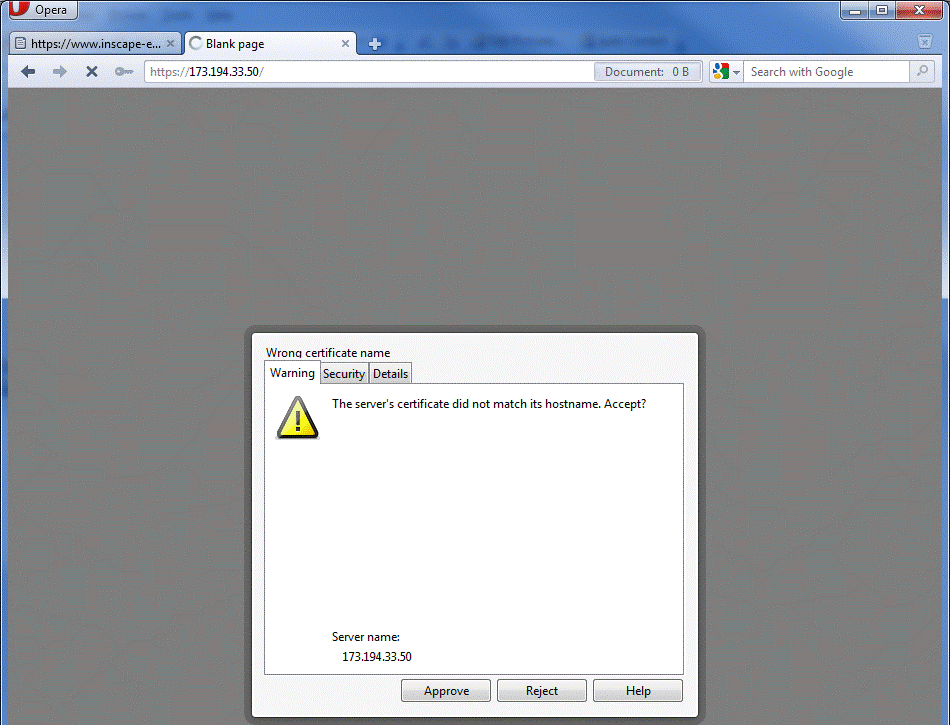
Any time a user sees one of the following errors or warnings, the server admin has failed.  A user, no matter how technical, should NEVER be forced to answer these questions.  Every time a user is trained to hit Yes, or OK to one of these errors, the user is being trained to fail.


https://blogger.googleusercontent.com/img/b/R29vZ2xl/AVvXsEjReRrTzqmwVJFFWLSb1SYAzSp8mKzlUd1q9k603ttHSvi0YNb3hBvgiGy7zTqPoJ9WCgxKgEfPO6fEmVISLxw44-iyPsIEKSdIWua8qWTxG9S9VtW9lPdp6ROfmY2Q2Pl8lo0BUMhCpGg/s640/1.gif

Figure 1 IE SSL Error


https://blogger.googleusercontent.com/img/b/R29vZ2xl/AVvXsEjNElOXZbCZQ-DUbxZ9HSgV3nrgOiPAMlF8yRf0oRAND2TiO_N1iLFkdrnDjrO1zHehTTZTiU257xNp6sMqEuX7iUlIA4ho_C2TquB9bxE-YSFzO56WcYtb-K0aany-u8xaC_mhAYkpvg4/s640/2.gif

Figure 2 Firefox SSL Error


https://blogger.googleusercontent.com/img/b/R29vZ2xl/AVvXsEjAasqUEsIoXYXzq4ST4wSFmgbfPvk-iqmJ_sBx4PysHOZODy_60d2c4sLt6TPY5hJdrYEyFytuNI1T9UkugvRvnXOgKDMPXgh0xLKIArW2Qv1HjIYeUImpVQ2erirhBJi2mG4IxIpXgxk/s640/3.gif

Figure 3 Opera SSL Error


https://blogger.googleusercontent.com/img/b/R29vZ2xl/AVvXsEg4HkknWpgZ4PVNkU30seR_p-Duatx2AcWcAJgkv7nDqFsvMe9BdoeQiDXDgyxAnlgcH7ADXtKTJc8X9Ar6EUTub4lwSi3O5LF50ljZQxYQjaAfvNl52OgjDvq9XrWbA4s_Vn1NNozBA68/s640/4.gif

Figure 4 Chrome SSL Error


Different browsers may have slightly different text for different failures, but most users will think of them as the same thing, “The place where I have to do an extra click to get to my site”.   


Who is Protecting Whom

This document only covers standard, run of the mill SSL, where the server has a certificate and the client does not.  Two way or Mutual TLS is not commonly used and not covered here.  One of the things that confuses people about SSL is that it is designed to allow the client to protect itself and provides on protection or authentication of the client for the benefit of the server.   The server operator or application owner is supposed to be giving the client everything it needs to make sure the connection is secure.  Presumably the user is going to submit some data that he or she does not want disclosed.  If you are running an application where the liability is not on the client, standard one way SSL is not enough for you.  You are assuming a risk that you have no control over and you need additional controls.  This is the case with most online banking in the US.   If the customer loses his password to an attacker, and the attacker drains the account, in many cases, the bank is liable.  There have been a few cases recently where banks have been able to successfully put the burden on the customer.

It is safe to assume that if your application is misconfigured such that the client cannot accurately verify that the connection is secure, your end user will be able to make a successful case as to why the risk should be shifted to you, despite any Terms of Service or other contract that may state otherwise. 


Help Them Help Themselves

There are many criteria that the client can use to determine if it should trust a connection to a server.  While some clients may chose to ignore some of the criteria, it is wise to do everything right, and avoid any issues.

Subject Common Name

The Subject of the certificate is a description of the entity that offers it to a client.  To those familiar with LDAP, it may look like and x.500 Distinguished Name (DN), and it is in fact referred to as a DN.  For example:

subject=/C=US/ST=California/L=Mountain View/O=Google Inc/CN=www.google.com

However, most of the DN is arbitrary and with the inclusion of E=, for email address, it has no hierarchical convention like an LDAP DN.   While some lament this inclusion, unless there really is an LDAP to look at, who cares if the data is actually hierarchical… 

There are two exceptions to the “arbitrary” nature of the subject.  First, parties may choose to check the subject for a specific value.  Cisco VPN concentrators, for instance, can check that a certain OU or L is included.

By far the most important, for SSL/TLS is the CN, or common name.  Most clients check to make sure that the CN matches the name that the client is attempting to connect to.   This may be the most common configuration error.  The reason for this is that as a web developer, you can’t control what the user enters in their address bar.  Maybe the user will type google.com or maybe they will type www.google.com, or they might try and access some named service like maps.google.com.   They may even type in an IP address.  Often two or more of the sites may be hosted on the same server at the same IP address.  To keep things nice and consistent, many web developers may redirect the connection to the pretty named site.  This is how google does it if you enter http://google.com into the address bar:

HTTP/1.1 301 Moved Permanently

Location: http://www.google.com/


While this works great with non-SSL sites, this will fail with HTTPS unless you plan correctly.  The reason that this fails is that the SSL negotiation happens BEFORE HTTP data can be passed.  You can’t have an HTTP redirect if the SSL negotiation fails.  This is the reason that many think that you cannot use host header based virtual sites with SSL.  They are wrong, you just have to know what you are doing and get the right certificate.

We have two different options, if we want a certificate to work with multiple names.


Wild Cards Certificates

One answer to the problem of name matching is to just get one certificate that can answer for all hosts in your domain.  RFC 5425 defines a wildcard that can match any host in a domain, so the subject common name *.google.com would work for www.google.com, google.com, and mail.google.com.  While some clients seem to allow the wildcard to match domains as well as hosts, the RFC forbids this, so avoid it.  For example, *.google.com should not work for www2.maps.google.com, as only the leftmost name is the host portion.  Everything to the right is domain, and the * is not supposed to figure into domain matching.  The domain here is maps.google.com.


Subject Alternate Name

The other option, especially if you are using host headers for sites that do not share the same domain name, is to use the subject alternate name or SAN.  The SAN is a list of names that can also be checked by a client.  One certificate could then be used for www.google.com and www.gmail.com.   While clients are supposed to be able to parse both the subject common name and the SAN list, some do this poorly, therefore it is wise to add the subject common name to the list of SANs as well.


Picking the Right Name

As stated above, the client will match the name it thinks it is connecting to to the names on the certificate.  In the case of a web browser, this is the name in the address or URL bar.  This means that if your site is behind a load balance, then the common name must match the DNS name that resolves to the load balancer.  The client has no idea there may be a cluster and load balancer.


https://blogger.googleusercontent.com/img/b/R29vZ2xl/AVvXsEgSLXZhn_FsMMOuU30BubV2moCOBdGjA_3epWVWbF_CFsp-YsvmsfGDHfVzekSvHz31B1nL90QEd5SMoghkSF_4b6Kab_WJyAhF2G7a6IR86eS6XCJPgtLFfCkZhkBJyB0tyAGryMAqyTk/s320/5.gif


Figure 5 Typical Web Cluster


In Figure 5, the proper common name for the certificate would be www.google.com.

In some corporate environments, users may bypass the load balancer in certain circumstances.  In this case, the certificate may need SANs or to use a wild card.


Time Validity

Certificates contain a Valid From and Valid To date.  The client will check to verify that the date of the connection attempt is between the two dates.  Don’t let your certificates expire.


Certificate Revocation List Distribution Points

Generally it is thought that only PKI operators need to be concerned with CRLs and CDPs (CRL Distribution Points).  This is not the case.  A CRL is a list of certificates that the issuing CA has determined are not to be trusted.  Not all certificates list a CRL, obviously if one does not exist, you don’t care about them.  If the client determines that the certificate it is inspecting is listed on the CRL, it should reject the connection.  The reason you should be concerned with CDPs, as an application owner, is that your clients will attempt to read them.  Different clients react differently when they fail to access the CRL.  Some clients will fail open and allow the connection and some will deny it.  If you know your clients are behind highly restrictive firewalls, you may need to make sure that they have access not just to your site, but also to the CDP.  This is a common place to fail in a B2B or corporate environment.


Basic Constraints, Key Usage, and Enhanced Key Usage

A good PKI book or web site would never lump these all together, but this is neither of those.  Each of these is a field that can describe how the certificate or the associated private key can be used.  Some clients may choose to make decisions based on these.  IE for instance will allow and SSL connection to a server with no EKUs listed, but if the EKU section is used and the server authentication usages is not listed, it will deny the connection.

If the Basic Constrains listed in the certificate of the CA that signed your SSL certificate doesn’t list it as a CA, the client should abort the connection.  This keeps someone from using a certificate and private key as if it were a CA.  In the past, vendors forgot to check this, and anyone who bought a legitimate SSL certificate could use it to sign other certificates that were otherwise cryptographically sound.

Key Usage should list Digital Signature and Key Encipherment; if Key Usage is defined without Key Encipherment the client should abort the connection.  If Key Usage is not listed, all uses are allowed.


The Chain

The server’s SSL certificate does not exist in a vacuum.  It is at the bottom of a PKI hierarchy.  Without the context of the PKI the SSL certificate is useless.  The beauty of using PKI to secure (authenticate, negotiate keys and provide integrity checks) an SSL connection is that this can be done with a relatively small number of trusted third parties.  One of the big reasons to leverage PKI is to avoid the risks and overhead of increasing the number of parties you, or your clients, have to trust. 

A quick reminder about key management; there is NO WAY to exchange key material securely, over an un-trusted network, without an out of band trust being established.  Diffie–Hellman does not provide authentication, so there is no way to know which party you are negotiating with.  RSA key pairs are useless as well, as the public key must be distributed securely in order for it to be trusted.  This is why OSs, Java, web browsers, and such have keystores as part of their distributions.  Ponder this; did the browser or java package you downloaded come over via SSL or could an attacker have poisoned the keystore in the package?

The root CA is the most important element in a PKI.  The trust it conveys is significant and makes it easy to extend trust to a huge number of parties.  In order to extend this trust, subordinate CAs can propagate that trust.  It is common for a well built PKI to be two or three tiers.


https://blogger.googleusercontent.com/img/b/R29vZ2xl/AVvXsEiCi-xe7VRSi-vx9yrZ3B5VNaLnoxdq-NI4dHubs3hLJR-vXCDx_5fbWzbqJWFzVswLIcryKeT0QJzoucXy6UXJY_ixvoNyxsi6muSUkEu3o3W74aYa3zjhwFjDkXGjfLpwiNaxEdWW35U/s640/6.gif

Figure 6 Typical 3 Tier PKI


To increase security and usability, one should never ask a client to trust a subordinate CA or SSL certificate explicitly.  Trust should always extend implicitly from the Root CA.   Any time you ask an end user to make the decision to trust a certificate, YOU HAVE FAILED.

It’s alright to configure dev and test wrong, right? NO!!  None of your testing is valid if you don’t configure your dev and test correctly.  Additionally, dev and test are your chance to make sure you fully understand how to configure your systems correctly.  In the parlance of sports, “You play how you practice”.  So don’t practice failing.   It is well worth the extra 10 minutes to get this right.

This hierarchy is built so that a security failure at a lower level can be eliminated by simply revoking a certificate and effectively pruning an entire branch of the PKI.  Figure 6 shows the chain belonging to webmail.T-Mobile.com, whereas Figure 7 shows the entire PKI.  If the A1 CA, in Figure 7, were compromised, the root could simply revoke the A1’s certificate and A1 and everything below it would no longer be trusted.  This has no negative effect on L1C or L1B or anything below them. 


https://blogger.googleusercontent.com/img/b/R29vZ2xl/AVvXsEh-tH0yXw6yRnrQe28LnESEwbtuppdgPwJoI3beMubUGLCb7cQfFC0EtJOBtUyFZSTmeUMC1rDpwjjwQ_lhg5jPtoH-ZbA60mDtu1QSxGJ4gvx5K2n17M0UZP0x1ahD6bhZVs_kBqmpYH0/s640/7.gif

Figure 7 Big PKI


This type of design reduces the overall damage that can be done by a successful attacker.  Usually the root is offline in a vault, so it can’t be hacked.

If the client only trusts the Root, but the SSL certificate is signed by an issuing CA, like L1C in Figure 7, how does the client bridge the gap and get the trust extended to it?  The chain MUST be sent by the server as part of the SSL negotiation. 

This is another area of common misconfiguration.


https://blogger.googleusercontent.com/img/b/R29vZ2xl/AVvXsEgRQ_ps2dqcCrpPoqQ-3XdX-0oWveq4qRc4pIqLu0Owq08nxt6jKxR6mjHNd24dgVBPhxrApZKwBftHPcFrV2I0DlCRLKS39EgeMrESkS5Ftv5IN1QI-2RsCibDc01Uup45BhWAbYTS4EY/s640/8.gif

Figure 8 Wireshark sees 3 certificates


We see in Figure 8, a properly configured server sending the SSL certificate, the Issuer CA certificate, and the intermediate CA certificate.   If we look at the Intermediate CA certificate, it will list its issuer as the Root, Entrust, which the clients hopefully trust.  This is enough data for the client to “build” the chain and cryptographically verify that no monkey business has occurred.

As part of building the chain, the client will perform all the checks above, time validity, not revoked, etc, on each certificate in the chain.  If any check fails, the client should abort the connection.  If the chain successfully builds to the root, then the client can allow the session and security is assured.  


Forcing SSL

Another common mistake is not forcing SSL and simply enabling it.  Some site owners and designers wrongly assume that the only time they need SSL is during authentication.  If the user’s authenticated session has any value at all, then the entire session must be SSL protected.  HTTP sessions are trivial for an attacker to hijack.  Additionally, configurations on a site that mix HTTP and HTTPS are prone to human error induced problems.   Rather than trusting that links include HTTPS or that only certain pages are set to require SSL, instead set the entire site to require SSL.   All the arguments about the extra processor load of SSL haven’t been relevant since 2003 or so. 


Why All the Failures?

It would be nice if there was an easy to identify, universally hated, body like congress that could be blamed for SSL failures.  Vendors meet this requirement well.  SSL certificate vendors point their fingers at the application and OS vendors and the application and OS vendors blame the SSL certificate vendors and the open source community.  The overall problem is that there is a knowledge gap between the vendors and the admins who setup the servers and applications.  Very few admins know what the chain is, how to send it, or how to verify that it is being sent.


Verifying the Chain is Sent

Getting the chain sent, in the first place varies by application and platform, so it is best covered later.  Checking that the chain is sent is easy.  Simply install openSSL and run this command:

openssl s_client -connect host:port


This returns a very handy output full of useful information, including:

Certificate chain

 0 s:/C=US/ST=Texas/L=Frisco/O=T-Mobile USA, Inc./OU=USA/CN=webmail.T-Mobile.com

   i:/C=US/O=Entrust, Inc./OU=www.entrust.net/rpa is incorporated by reference/OU=(c) 2009 Entrust, Inc./CN=Entrust Certification Authority - L1C

 1 s:/C=US/O=Entrust, Inc./OU=www.entrust.net/rpa is incorporated by reference/OU=(c) 2009 Entrust, Inc./CN=Entrust Certification Authority - L1C

   i:/O=Entrust.net/OU=www.entrust.net/CPS_2048 incorp. by ref. (limits liab.)/OU=(c) 1999 Entrust.net Limited/CN=Entrust.net Certification Authority (2048)

 2 s:/O=Entrust.net/OU=www.entrust.net/CPS_2048 incorp. by ref. (limits liab.)/OU=(c) 1999 Entrust.net Limited/CN=Entrust.net Certification Authority (2048)

   i:/C=US/O=Entrust.net/OU=www.entrust.net/CPS incorp. by ref. (limits liab.)/OU=(c) 1999 Entrust.net Limited/CN=Entrust.net Secure Server Certification Authority

---   


0 is the SSL certificate and the numbers go up.   The subject and issuer DNs are listed to make an easy visual verification of the chain.  You can see that this application does not send the root. If you wish to verify the entire chain cryptographically, you can use the –CAfile argument and reference your Root CA certificate, in PEM format.

This would include the following line, assuming the chain checked out:

Verify return code: 0 (ok)


Sending the Chain

This section is the real reason this document was written.  There is very little guidance on the web telling admins to send the chain or how to send the chain, and often vendor documents brush over this and or don’t even cover it.

Windows

This section may be a bit of a generalization, as many applications can run on windows that use their own SSL code.  If the application uses the OS’s SSL, CAPI or CNG, then the OS will attempt to build and send chain based on what it finds in the machine store, or the store of the account running the server or application.  This will apply to all MS server applications, such as IIS, Exchange, Active Directory, etc.  Unless the developer overrides the default behaviors, this will apply to .NET apps as well.  To make sure that the OS can find the certificates in the chain, make sure that they are all in the same “My” or “Personal” store that holds the SSL certificate.  Windows can find the certificates in the other stores as well, but it is nice to know there they are and be clear which certificates are which.


https://blogger.googleusercontent.com/img/b/R29vZ2xl/AVvXsEgwL_GQuFJZQOtR1IL_fnbm3jUxb0Sm8V2jzaLy7PaDIqV6g0Nz6ULm48fBewbJRjMu5wmeEFqALWKumfhDWlcyTeY-kgIgL0buYjBNX6a4Iv423cGv-o47Ujlgh_yrQXCY9yWXVyIAxxE/s640/9.gif

Figure 9 Windows Machine Stores


Java

No matter which OS your JVM is running on, or the version of JVM you are running, there is one keystore that is part of the build.  The cacerts file found under lib/security holds the list of trusted CAs.  Java keystore files use passwords.  The default password for your cacerts file is ‘changeit’.  This is the list of CAs that you JVM will trust by default.  If a client side Java application will use SSL, this is the store that the trust will be based on, unless the developer made a decision to use a separate store.  The Java keystore format is proprietary, and is sometimes referred to as JKS.  Sun provides the executable ‘keytool’ to create, edit, and inspect keystore files.  Newer versions of keytool and Java seem to make it harder to mess up creating the keystore, but in older versions mistakes are very common and allowed by keytool.  The JKS file format is a password protected wrapper that should contain all the CA certificates in your chain.  Inside that wrapper is another password protected wrapper that holds the private key corresponding to your SSL certificate.   For best results, when creating your keystore file, import the CA certificates starting from the root and working down, installing the signed SSL certificate last. 

The process goes like this:

Italicizes text is entered by you.  Non-italics is command output.


Create the Keystore and Key Pair

From command prompt type the following to create keystore.

 keytool -genkey -alias sslcert -keysize 2048 -keyalg RSA -keystore keystore.jks


The following attributes must be specified.  Remember what the password is since it will be needed when setting up server and importing signed certificates.

Password: password

First and Last Name: (must be the FQDN of the server or the F5)

Organizational Unit: (ex. used Operations in particular example)

Organization: (ex. used Company USA.)

City or Locality: (ex. used Seattle)

State or Province: (ex. used Washington)

Two Letter Country Code: (ex. used US for United States)


Once attributes have been inputted, user is asked to verify information.

Select "y" and hit


The user is then asked for key password for < sslcert >, use same password type above and hit


Keystore has now been created.


Create the Certificate Signing Request

From the command line enter

keytool -certreq -alias sslcert -keystore keystore.jks -file ssl.req


Get the file ssl.req to the CA admin or vendor for signing.


Once the Certificate has been signed, the admin or vendor will return the certificate file.  In the example, this is certnew.cer.


Import the CA Hierarchy Certificates

Before importing the signed certificate into your keystore you will need to establish the trust by importing the CA Certificates.  Always start with the root CA and work your way down.  This example will show a three tier PKI.


keytool -import -trustcacerts -alias MYRoot -keystore keystore.jks -file "Company USA Root CA.cer"

Enter keystore password:  password

Owner: CN=Company USA Root CA

Issuer: CN=Company USA Root CA

Serial number: 311a0088059a3abe4afb6520a6f749d8

Valid from: Thu Jan 04 12:54:35 PST 2007 until: Mon Jan 04 13:00:47 PST 2027

Certificate fingerprints:

         MD5:  82:0D:0C:3C:24:09:D6:9C:84:A7:6D:C3:CA:44:F8:C0

         SHA1: 5F:62:6A:91:5D:0D:26:F6:FB:AF:76:92:8C:2A:F1:C6:CD:D2:66:0F

Trust this certificate? [no]:  yes

Certificate was added to keystore


keytool -import -trustcacerts -alias MYInt -keystore keystore.jks -file "Company USA Intermediate CA 01.cer"

Enter keystore password:  password

Certificate was added to keystore


keytool -import -trustcacerts -alias MYIssuer -keystore keystore.jks -file "Company USA Issuer CA 02.cer"

Enter keystore password:  password

Certificate was added to keystore


The alias creates a friendly name to list the CA in the keystore.  Each alias must be unique, so make up useful, but unique names.


Import the Signed Request File

The signed request file must be imported back into the original file.


keytool -import -trustcacerts -alias sslcert -keystore keystore.jks -file certnew.cer

Enter keystore password:  password

Certificate reply was installed in keystore


You now have a properly built Java keystore.


openSSL

openSSL is a fantastic tool and set of libraries that is leveraged by many applications.  OpenSSL’s native format for dealing with certificates, certificate signing request, and keys is the PEM format.  OpenSSL is the most versatile tool for dealing with certificates and keys, as it can convert to and from almost any format, except the Java keystore. 

A typical PEM formatted certificate looks like this:

-----BEGIN CERTIFICATE-----

MIIFuzCCBKOgAwIBAgIETBsbdDANBgkqhkiG9w0BAQUFADCBsTELMAkGA1UEBhMC

VVMxFjAUBgNVBAoTDUVudHJ1c3QsIEluYy4xOTA3BgNVBAsTMHd3dy5lbnRydXN0

FPagpeXsGSr0ipNqRy6m1T2mAO3Ok2B4hK6pBnhtf2n7oY1LB/e1rSIHTivJ9eaN

rOCwFjRf+bcELIi2manBx9zI0Qy8JES3vzXBG3xMkJ4Vv3QI93Uk4qn3jodtCPNj

DZZTUPbnHqRshXE6zSB7S6BvRbsmaYps9JF1+j5e3Q==

-----END CERTIFICATE-----


The chain file is just the individual CA certificates in one file, end to end, starting from the issuing CA, moving up to the root, like so:

-----BEGIN CERTIFICATE-----

MIIFuzCCBKOgAwIBAgIETBsbdDANBgkqhkiG9w0BAQUFADCBsTELMAkGA1UEBhMC

VVMxFjAUBgNVBAoTDUVudHJ1c3QsIEluYy4xOTA3BgNVBAsTMHd3dy5lbnRydXN0

rOCwFjRf+bcELIi2manBx9zI0Qy8JES3vzXBG3xMkJ4Vv3QI93Uk4qn3jodtCPNj

DZZTUPbnHqRshXE6zSB7S6BvRbsmaYps9JF1+j5e3Q==

-----END CERTIFICATE-----

-----BEGIN CERTIFICATE-----

MIIE8jCCA9qgAwIBAgIEOGPp/DANBgkqhkiG9w0BAQUFADCBtDEUMBIGA1UEChML

RW50cnVzdC5uZXQxQDA+BgNVBAsUN3d3dy5lbnRydXN0Lm5ldC9DUFNfMjA0OCBp

PFS+/i/qaZ0cHimbltjI/lGQ8SSmkAaz8Cmi/3gud1xFIdlEADHzvjJP9QoyDfz8

uhZ2VrLWSJLyi6Y+t6xcaeoLP2ZFuQ==

-----END CERTIFICATE-----

-----BEGIN CERTIFICATE-----

MIIEnzCCBAigAwIBAgIERp6RGjANBgkqhkiG9w0BAQUFADCBwzELMAkGA1UEBhMC

VVMxFDASBgNVBAoTC0VudHJ1c3QubmV0MTswOQYDVQQLEzJ3d3cuZW50cnVzdC5u

RfPB+JbFi1WkzGuDFiAy2r77r5u3n+F+hJ+ePFCnP1zCvouGuAiS7vhCKw0T43aF

SApKv9ClOwqwVLht4wj5NI0LjosSzBcaM4eVyJ4K3FBTF3s=

-----END CERTIFICATE-----


Note that the begin and end certificate statements are left in place. 

To create a key pair and certificate signing request do the following:

openssl req -new -newkey rsa:2048 -nodes -out file.csr -keyout file.key

This will output your key files and CSR.  The vendor or PKI admin should sign the CSR and return your SSL certificate as well as the CA certificate in your chain.

With the returned files and openSSL, the sky is the limit.


Apache

First off, there are a couple of ways to configure HTTPS on apache.  The main methods are via mod_ssl and Apache-SSL.  Apache-SSL has not been updated in a while and should be avoided.

Mod_ssl uses openSSL libraries, so you will need openSSL to do anything fun.  The native file format for openSSL is called PEM or base64, which are text files, rather than the DER format, that is binary. 

The file that will contain your SSL settings is the httpd.conf file.  There are three settings that you will care about.

SSLCertificateFile  -  This is the actual SSL certificate

SSLCertificateKeyFile  -  this is the associated private key file.  If there is a pass phrase on the key, it must be entered at startup.  This may not be appropriate for some environments.

SSLCertificateChainFile  - This is chain file as described above.

F5 Local Traffic Manager – BigIP

First of all, you probably should not be terminating SSL on your F5.  “Need to know” or “reduced surface area” says that you don’t want the F5 techs to be able to see your decrypted traffic.  There are few good cases for decrypting SSL at the F5.  If you need to inspect host headers or URLs, this may be necessary.

F5 uses openSSL so the section above will help get the needed key and cert material.

In the SSL Client Profile, there is an option to set the Chain file.  Simply copy over the chain file in the openSSL format and apply the setting.


Forcing SSL

SSL should be forced at the web site level, to eliminate human error.

IIS

In IIS you can define the SSL settings at the site level, virtual directory level, or the page/object level.  The best place to do this is at the site level.


https://blogger.googleusercontent.com/img/b/R29vZ2xl/AVvXsEiygGNG4F6YKvQzWNczNfkgXoxkrwC2faBO4PLBfvu6btCXjABgDpgOugO2dpA4YggOgsSKcNDQA9K_3uYWCMgcPnlBNUGpKCCkrQIxnHS4audY4Yas_bdRyhyphenhyphenU8jVmiOxqrYy8hHNYXU0/s640/10.gif

Figure 10 Requiring SSL in IIS6


https://blogger.googleusercontent.com/img/b/R29vZ2xl/AVvXsEhO5xaxGZruhYzmCFx9pjkyKumgGjVlyYIQOKWDZVYQGNRSnMWwWLi-YG2fsHpdJpsUP2VIt1OoPyKHDlJVazvqYXTNTfQ0GDPiUM892bW-jp7jpWJbFKUrMHuKAtflTZ2T2BCMpPc9q6g/s640/11.gif

Figure 11 Requiring SSL in IIS7


In order to make a better experience, consider changing the default 403.4 HTTP error page to a redirect page, so the user does not get an ugly error.


Apache

In the httpd.conf file, use the directive SSLRequireSSL to require SSL all the time.  http://httpd.apache.org/docs/2.0/mod/mod_ssl.html#sslrequiressl

In order to make the end user experience better, consider implementing a redirect from HTTP to HTTPS, rather than just blocking HTTP.  http://www.besthostratings.com/articles/force-ssl-htaccess.html


F5 LTM

The LTM does not have extra ports setup by default.  If you do not setup the HTTP port, the user will get a server not found error.  Consider creating a VIP and iRule that redirects the user to your HTTPS site.

The iRule would look like this:

when HTTP_REQUEST {

HTTP::redirect "https://[HTTP::host][HTTP::uri]"

}  


This simply redirects the browser, rewriting the URL with and HTTPS replacing the HTTP.


Not Covered

A few things may seem to be missing here.  This document focuses on PKI related configuration.  Different apps and OSs also have other SSL/TLS settings that are not directly related to PKI. 


Cipher Suites

As part of the SSL negotiation, the client and server agree on a ciphersuite that is common to them both, hopefully the strongest common suite.  As attacks and computing power change, the “best” ciphers change.   It is called a suites, as it defines ciphers users in four areas, authentication, key exchange, messaged integrity check (MAC), and the bulk (symmetric) cipher used, including mode, for block ciphers.  There is a wide array of combinations of these parameters.  As the suite is only as strong as its weakest link, most ciphersuites should be eliminated from your configuration.  As of December 2011, you should eliminate any suite that sets any of the four areas to null.  You should eliminate any suite that relies on MD5 for its MAC. You should eliminate any ciphersuite that uses a block cipher in CBC mode.  One should also eliminate suites that utilize a symmetric cipher with a key shorter than 128 bit.

For more on CipherSuites, see http://tools.ietf.org/html/rfc4346


Windows

Microsoft allows you to pick the ciphersuites you will allow, as well as prioritize how they will be negotiated.  A good place to start is here http://msdn.microsoft.com/en-us/library/windows/desktop/aa374757(v=vs.85).aspx .

We aware that XP/2003 and Win7/2008 have different settings and available suites.


Java

The Java Class SSLSocket allows the developer to adjust the suites used.   http://docs.oracle.com/javase/1.4.2/docs/api/javax/net/ssl/SSLSocket.html


F5


Apache

Apache support for changing your ciphersuite can be found here http://httpd.apache.org/docs/2.0/ssl/ssl_howto.html


Mixed Content

I won't go into how to fix it, or configure your systems, cause you don't pay me...  but, creating a page that uses SSL, but that has elements in the page that are not over SSL is called creating mixed content.  This is common for those who use CDNs, as their images are all served up via HTTP.  


Mixed content gives the user fun symbols that indicate badness, but how bad??  We can't expect users to make the call on this kind of thing.  


https://blogger.googleusercontent.com/img/b/R29vZ2xl/AVvXsEgrOnxWOUV0o3mwoyuPRq2c1Y76MCXtYkr0Rl-cOl1T1h0ZOnINLv4bvjdUlkPGH87TLFfb_1t5zR21rukObqwagO0viU6oW1K3XT6I7yYx8GPWquInURDgmEdDGTCZ_Vn7qlH90WUo0hU/s1600/12.gif

Figure 12 Google Reader Throwing Mixed Content Error in Chrome 


What's a user supposed to think when they encounter Figure 12?  Can your mom or grandfather get meaning out of this explanation?  https://support.google.com/chrome/bin/answer.py?hl=en&answer=95617 


Summary

If you want to make the customer experience good, and avoid litigation, make sure to configure SSL on your web servers correctly.  Any failure in your configuration may put the client at risk, but it may be a risk that is assumed by you, due to contracts.

Make sure you:

  • Set the right subject common name
  • Send the chain
  • Have time valid certificates
  • Include the right usage information
  • Force SSL
  • Have verified that the CRLs can be reached
  • CHECK YOUR WORK

Tuesday, February 23, 2010

How I Learned to Stop Hating Java and Start Loving s_client

Got SSL problems? Ask me how s_client can help!

Have you ever had one of those days when a customer tells you that they can connect to your server using SSL, but not to the F5 load balancer in front of it? Here's my tale.

I provide LDAP over SSL access, to a group of my domain controllers, by way of an F5 load balancer. None of the apps that use this are AD aware, so we just have one virtual IP (VIP) on an F5 on port 636. I don't want to add Subject Alternate Names (SANs) to my DC certificates, so we terminate SSL at the F5 and then create a new SSL session from F5 to the appropriate DCs.

As the PKI that issues our SSL/TLS certificates is internal, it is common to have to help our customers provision their local CA trust stores to trust our Root CA. Nearly all of the systems that use the F5 are Java based. Since setting up the F5, we've noticed that the systems required our customers to install all three tiers of our PKI in to their local trust store. This seemed odd, as my experience has always been that importing the root alone was good enough to allow proper chaining. We always chalked it up to weak chaining code in the Java stack. How foolish of me/us!

Last week we had a fresh windows machine try and use the F5 and they got the same result. That is, he failed to connect to the load balancer, getting a failed trust error. The customer had only installed our Root CA in his trusted roots store. Instead of just adding all the tiers of our PKI, the customer decided to point directly at one of our DCs. To my surprise, he connected with no chaining failures. Apparently the Root CA was good enough when connecting to the DC, but no for the F5.

At that point, I stopped blaming Java and demanded answers. Enter my new trusty friend openssl s_client. s_client establishes an SSL/TLS session with a server and then waits for you to send commands. Think of it as getting a socket, like telnet, only after establishing an SSL session first. But wait, there's more... s_client can also tell you all about the SSL session in question.

openssl s_client -connect server:port -showcerts will also show you what is being negotiated by your server and client.

When connecting to my DC directly I got:

CONNECTED(00000730)
---
Certificate chain
0 s:/CN=DCserver.domain.org
i:/DC=org/DC=domain/CN=Fun USA Issuer CA 02
-----BEGIN CERTIFICATE-----
MIIF5TCCBM2gAwIBAgIKS5ibh
-----END CERTIFICATE-----
1 s:/DC=org/DC=domain/CN=Fun USA Issuer CA 02
i:/CN=Fun USA Intermediate CA 01
-----BEGIN CERTIFICATE-----
MIIF/zCCBOegAwIBA
-----END CERTIFICATE-----
2 s:/CN=Fun USA Intermediate CA 01
i:/CN=Fun USA Root CA
-----BEGIN CERTIFICATE-----
MIIF5jCCBM6g
-----END CERTIFICATE-----
---
Server certificate
subject=/CN=DCserver.domain.org
issuer=/DC=org/DC=domain/CN=Fun USA Issuer CA 02
---
Acceptable client certificate CA names
/C=US/O=VeriSign, Inc./OU=Class 1 Public Primary Certification Authority - G2/OU=(c) 1998 VeriSign, Inc. - For authorized use only/OU=VeriSign Trust Network
/C=US/O=First Data Digital Certificates Inc./CN=First Data Digital Certificates Inc. Certification Authority
/C=ZA/ST=Western Cape/L=Cape Town/O=Thawte Consulting/OU=Certification Services Division/CN=Thawte Personal Basic CA/emailAddress=personal-basic@thawte.com
/C=US/O=VeriSign, Inc./OU=Class 1 Public Primary Certification Authority
/C=US/O=VeriSign, Inc./OU=Class 3 Public Primary Certification Authority - G2/OU=(c) 1998 VeriSign, Inc. - For authorized use only/OU=VeriSign Trust Network
/C=US/O=GTE Corporation/OU=GTE CyberTrust Solutions, Inc./CN=GTE CyberTrust Root
/OU=Copyright (c) 1997 Microsoft Corp./OU=Microsoft Corporation/CN=Microsoft Root Authority
/DC=com/DC=microsoft/CN=Microsoft Root Certificate Authority
---
SSL handshake has read 7832 bytes and written 318 bytes
---
New, TLSv1/SSLv3, Cipher is RC4-MD5
Server public key is 1024 bit
Compression: NONE
Expansion: NONE
SSL-Session:
Protocol : TLSv1
Cipher : RC4-MD5
Session-ID: 80050000AB7EA7AC223A31DAE93EFE553CFFEB093D224D59C6C3DD169AFEA1D3
Session-ID-ctx:
Master-Key: 382218AB63FFC1A874DAD739E48630D8410F05FFE24BAEF54DF7E88578DE2720AF111FF4E7C052A42A357AB476C205B5
Key-Arg : None
Start Time: 1266967263
Timeout : 300 (sec)
Verify return code: 20 (unable to get local issuer certificate)
---


You can see that the server and client negotiated a TLSv1 session using RC4-MD5. More importantly, for me, we see what certificates the server offered up for the SSL connection. I've truncated the output to remove most of the base64 encoded certificate data, as you don't need it. It can be useful if you know what to do with it, but that is out of scope. You can see that my DC will allow client certificates, but is not requiring them. You will see that the DCserver cert was offered up, along with the Issuer 02, the Intermediate, and the Root. This gives a client all the hierarchy to allow chaining to the Root, which was trusted.

When I ran the s_client connect against the F5, I got this:

CONNECTED(00000730)
---
Certificate chain
0 s:/C=US/ST=WA/L=Renton/O=Fun USA, Inc/OU=Business Systems/CN=f5.domain.org
i:/DC=org/DC=domain/CN=Fun USA Issuer CA 02
-----BEGIN CERTIFICATE-----
MIIGATCCBOmgAwIB
-----END CERTIFICATE-----
---
Server certificate
subject=/C=US/ST=WA/L=Renton/O=Fun USA, Inc/OU=Business Systems/CN=f5.domain.org
issuer=/DC=org/DC=domain/CN=Fun USA Issuer CA 02
---
No client certificate CA names sent
---
SSL handshake has read 1687 bytes and written 306 bytes
---
New, TLSv1/SSLv3, Cipher is RC4-MD5
Server public key is 1024 bit
Compression: NONE
Expansion: NONE
SSL-Session:
Protocol : TLSv1
Cipher : RC4-MD5
Session-ID: B53C2347A4947080D27A65929C3E2ADCFE6DCCFC70F57456BA8155E036347B4E
Session-ID-ctx:
Master-Key: 24E43E3324F07EDCA3C2F0DC790FFE0134B5B0FC027E08B46988A02A26A402780D548C1DAC8C8F3F1EFA0F071A098F8A
Key-Arg : None
Start Time: 1266967301
Timeout : 300 (sec)
Verify return code: 21 (unable to verify the first certificate)
---

As you can see, this is much shorter. The F5 was offering up only the server certificate and none of the chain. As the client only has the Root trusted, it cannot succeed in processing the chain. The only way a session like this can be trusted is if the client explicitly trusts the server certificate or the CA that issued the certificate.

I love s_client...

As it turns out, the F5 team forgot to load up the chain. Some systems won't even offer up SSL without a valid chain, but F5 is way better!


Thursday, June 25, 2009

Sniffing the Unsniffable

In a previous post I covered how to export a private key to decrypt SSL traffic in Wireshark. This is dandy, as long as you have access to the private key.

What do you do if you don't have access to the private key??? Perhaps you are using a windows box and the certificate policy is set to not allow the export of the private key. Yes, a super ninja can take it, if they know enough about the file locations and DPAPI, but it's hard. Maybe I'll cover that soon. What if you are the client and the server is some commercial service? You'll never get that key.

If you are on a windows host, you are in luck! Enter my new best friend, STrace, from Microsoft. STrace uses MS Research's amazing tool, detours. I'll avoid a huge digression and just say that detours is crazy awesome. It intercepts win32 functions in memory and allows the code to be altered on the fly. That's right "re-writing the in-memory code for target functions". Yikes!

STrace was written for something other than our purposes. It's meant to be used in conjunction with HTTPREPLAY. This allows of debugging a web browser session over and over, without the server. Booooorrrriiinnnggg. Actually it's very cool, but not for us.

One of the things that STrace does for us, to support its original goes, is to inject itself into processes that are using SSL. You simply find the PID of the process and inject the DLL and you get your data out, unencrypted. The data is in a format designed for HTTPREPLAY, which is only a bit of a pain.

Going for the Gold!
If you've ever dealt with LDAPS failures in AD, you know how tricky they can be. You can only watch the SSL negotiation, then you lose out. If the issue involves a lying crappy vendor of a developer who just read about LDAP when the project started, you always want to look at the data they are sending. LDAP on the wire never lies! Too bad that by default, the Domain Controller Certificate Template is set to not allow export of your private key. If you're like me, you may have the party turn off SSL and suddenly it all works. Hmmmm... We must see what is really being sent!

First off, the strace readme.txt is full of awesome and it's short. It's worth a once over.

The first step in the process is to figure out which process is our LDAP SSL server. We know that SSL for LDAP is on port 636, so we run netstat -b -n -a to get the list of ports and their process names and the PID

That gets us this:
TCP 0.0.0.0:636 0.0.0.0:0 LISTENING 428
[lsass.exe]

Now we know that LSASS is the process and the PID is 428. LSASS!! Oh no, that is super protected certainly we can't touch it. This may be the Holy Grail.

If you follow the readme file, your first attempt will fail. Luckily the error is mentioned right in the file.

Note that you may get some permission issue if you want to "inject" the STRACE DLL in "protected" processes (Injib may fail with error 5 (ACCESS_DENIED) on OpenProcess()). One way to workaround this problem is to run INJLIB from a CMD running under the system account.

That sound great, but how?

We will use some pstools to get the rest of what we need. If you don't know pstools and the Sysinternals Suite, you may not actually be a windows admin.

psexec -s will let us run a process as system!

let's try
psexec -s "C:\Program Files\STRACE\INJDLL.EXE" /p:428 /d:"C:\Program Files\STRACE\STRACE.DLL"

Now, if you run something like Sysinternals Process Explorer and do a find for "strace" you will see it is now attached to LSASS. No errors, no LSASS detects evil, shutting down...

At this point, you should see a strace log file on your desktop, but you don't. Sysinternals Filemon will show us why. The default location is the desktop, but where is system's desktop, it's not under documents and settings. Filemon finds it here.

C:\WINDOWS\system32\config\systemprofile\Desktop\STRACE_LSASS_PID_428_24062009_223405.LOG

3:35:26 PM lsass.exe:400 WRITE C:\WINDOWS\system32\config\systemprofile\Desktop\STRACE_LSASS_PID_428_24062009_223405.LOG SUCCESS Offset: 9630 Length: 26

Now, we can use some LDAP Tools to connect to the server over SSL and watch what happens.

When I bind to the DC, I get a whole lot, but I'll pull out the good stuff:

06/25/2009 23:55:41:078 - SecBuffer #1 BufferType:0x00000000 cbBuffer:47906816
06/25/2009 23:55:41:078 - SecBuffer #2 BufferType:0x00000000 cbBuffer:54197772
06/25/2009 23:55:41:078 - SecBuffer #3 BufferType:0x00000000 cbBuffer:-1
06/25/2009 23:55:41:078 - SecBuffer #0 BufferType:0x00000007 cbBuffer:5
06/25/2009 23:55:41:078 - SecBuffer #1 BufferType:0x00000001 cbBuffer:45
06/25/2009 23:55:41:078 - SECBUFFER_DATA - 45 byte(s) / DecryptMessage - OUTPUT
=====================================================
00 01 02 03 04 05 06 07 08 09 0a 0b 0c 0d 0e 0f 0123456789abcdef

0000: 30 2b 02 01 01 60 26 02 01 03 04 17 61 64 6d 69 0+...`&.....admi
0010: 6e 69 73 74 72 61 74 6f 72 40 62 6c 69 6d 2e 62 nistrator@blim.b
0020: 6c 61 6d 80 08 70 61 73 73 77 6f 72 64 lam..password
=====================================================
06/25/2009 23:55:41:078 - SecBuffer #2 BufferType:0x00000006 cbBuffer:16
06/25/2009 23:55:41:078 - SecBuffer #3 BufferType:0x00000000 cbBuffer:-1
06/25/2009 23:55:41:093 - SecBuffer #0 BufferType:0x00000002 cbBuffer:5
06/25/2009 23:55:41:093 - SecBuffer #1 BufferType:0x00000001 cbBuffer:22
06/25/2009 23:55:41:093 - SECBUFFER_DATA - 22 byte(s) / EncryptMessage - INPUT
=====================================================
00 01 02 03 04 05 06 07 08 09 0a 0b 0c 0d 0e 0f 0123456789abcdef

0000: 30 84 00 00 00 10 02 01 01 61 84 00 00 00 07 0a 0........a......
0010: 01 00 04 00 04 00 ......
=====================================================

We see here that it gets some buffers and decrypted messages. I see my username and password and then some sort of response.

To verify our suspicions, we make the same conneciton, this time without SSL and capture it via wireshark.

If we look for the same data, we get these two frames:

0000 00 0c 29 bb 00 2e 00 1a 4b 79 8d 34 08 00 45 00 ..).....Ky.4..E.
0010 00 55 c1 14 40 00 80 06 5c 60 0a 01 64 97 0a 01 .U..@...\`..d...
0020 64 95 0a 87 01 85 b6 56 6c 8e 73 0a 76 db 50 18 d......Vl.s.v.P.
0030 fc 00 d0 48 00 00 30 2b 02 01 01 60 26 02 01 03 ...H..0+...`&...
0040 04 17 61 64 6d 69 6e 69 73 74 72 61 74 6f 72 40 ..administrator@
0050 62 6c 69 6d 2e 62 6c 61 6d 80 08 70 61 73 73 77 blim.blam..passw
0060 6f 72 64 ord


0000 00 1a 4b 79 8d 34 00 0c 29 bb 00 2e 08 00 45 00 ..Ky.4..).....E.
0010 00 3e 26 b4 40 00 80 06 f6 d7 0a 01 64 95 0a 01 .>&.@.......d...
0020 64 97 01 85 0a 87 73 0a 76 db b6 56 6c bb 50 18 d.....s.v..Vl.P.
0030 fa c3 f6 bf 00 00 30 84 00 00 00 10 02 01 01 61 ......0........a
0040 84 00 00 00 07 0a 01 00 04 00 04 00 ............

If you notice, we have a byte for byte match for the bottom part of the packet. If you break out your TCPIP Illustraed, you will find that the top of each frame is the Ethernet, IP and TCP header data, we are getting just the LDAP protocol payload!

If we look closer, we see that all our LDAP traffic is there. The downside being, that we don't get information on the host sending the data and we don't have libcap format, so tools like wireshark can't dissect the protocols for us in a nice way. If you understand libcap, it looks trivial to create fake Ethernet, IP and TCP data and drop in the payload to make a libcap file, or use existing parsers to dissect the messages. Its beyond me though.

The last down side is that I can't find out how to un-inject the strace dll. So far, only rebooting has fixed this.

And that is that... If you can detour the SSL from LSASS, you can do it anywhere!

Wednesday, May 27, 2009

Analysis of Oracle Hyperion Web Analysis Studio 9.3 Logon Security

Before I start I'll point out that Oracle does not make any claims that the Hyperion Logins are secure without SSL. This analysis was performed to clear up misconceptions on the part of others.

Analysis of Oracle Hyperion Web Analysis Studio 9.3 Logon Security
Abstract
A quick vetting of how Hyperion handles usernames and passwords shows that their controls offer little protection of credentials while crossing the network, in the absence of SSL. While passwords are not sent across the network as clear text, they are only lightly obfuscated and subject to multiple attacks.
Hyperion should not be used unless the login pages are encrypted using SSL derived from a certificate that chains to a trusted Root Certificate Authority. This is most important when using the LDAP connector as it then puts credentials at risk that might grant access to other systems.

Analysis
There are multiple ways to take a look at Hyperion yielding varying results. Hyperion sends data via Java code to the app server via an unknown application protocol. It uses Java serialized objects, which may be meaningful to some else. At the TCP level, the usernames can be seen on the wire in clear text, along with what appears to be a base64 encoded password.
A message snippet looks like this:
------------------314159265358979323846
Content-Disposition: form-data; name="param type 1"
Content-Type: text/plain; charset=US-ASCII
Content-Transfer-Encoding: 8bit

com.hyperion.atf.security.authentication.IAuthenticationHelper

------------------314159265358979323846
Content-Disposition: form-data; name="param type 2"
Content-Type: text/plain; charset=US-ASCII
Content-Transfer-Encoding: 8bit

com.hyperion.atf.security.users.IUserManagerCreateTask

------------------314159265358979323846
Content-Disposition: form-data; name="param value 0"
Content-Type: application/x-java-serialized-object
Content-Transfer-Encoding: binary

....sr.
csPasswordt..Ljava/lang/String;L.
csUserNameq.~..xpt..DmFVYnsCImM=t..markgamache


------------------314159265358979323846

The first thing we see is that the protocol breaks up messages with Pi. Who knows… The second thing we see is that the helpful words, Password and UserName can be found. These are followed by DmFVYnsCImM=, presumably my password and then markgamache, my username. By simply trying a few attempts with different usernames and passwords, it becomes clear that we are correct in our assumptions. Third, but for later, we also get a java class name, hyperion.atf.security.authentication.SimplePasswordToken.

Replay Attacks
Before we look at any technical attacks, we’ll look at that messaging format. The TCP data sent along with the username and password contain no sequence numbers, nonces, or timestamps. As you will see in the next section, a username and encrypted password for an account do not change across login sessions. This makes it highly likely that a simple replay would allow access to a session as another user. This does not put the password at risk, only data within the application. If the application data is not encrypted, it is likely that the session could be hijacked as well. This is a smaller concern generally.
The next step is to try and make sense of the password data. The system lets us send as many usernames and passwords as we like.

Chosen Plaintexts
By sending data we select through the password encryptor, we can then analyze the results.

Username: markgamache
Username Hex: 6d 61 72 6b 67 61 6d 61 63 68 65

Password : 1q2w3e4r
Plaintext hex: 31 71 32 77 33 65 34 72
Cyphertext Hex: 0e 61 55 62 7b 02 22 63

Password: 11111111
Plaintext hex : 31 31 31 31 31 31 31 31
Cyphertext Hex : 0e 21 56 24 79 56 27 20

Password: 111111111
Plaintext hex : 31 31 31 31 31 31 31 31 31
Cyphertext Hex 0e 21 56 24 79 56 27 20 e9

Password: 22222222
Password hex: 32 32 32 32 32 32 32 32
Cyphertext Hex : 0d 22 55 27 7a 55 24 23

Password: 33333333
Password hex : 33 33 33 33 33 33 33 33
Cyphertext Hex : 0c 23 54 26 7b 54 25 22

Password: 44444444
Password hex : 34 34 34 34 34 34 34 34
Cyphertext Hex : 0b 24 53 21 7c 53 22 25

Password: 55555555
Password hex : 35 35 35 35 35 35 35 35
Cyphertext Hex : 0a 25 52 20 7d 52 23 24

Password: 12345678
Password hex : 31 32 33 34 35 36 37 38
Cyphertext Hex : 0e 22 54 21 7d 51 21 29


Username: ted
Username Hex: 74 65 64

Password: 11111111
Password hex : 31 31 31 31 31 31 31 31
Cyphertext Hex : ab 28 71 f4 fe cb 1d 46


Username: 1111
Password hex : 31 31 31 31 31 31 31 31
Cyphertext Hex : 51 2b f3 5c a6 76 db 43


Username : 2111
Password hex : 31 31 31 31 31 31 31 31
Cyphertext Hex : af a8 8d c5 48 db 27 7c


From the small sample, we can see a few things:
• If the username is unchanged, then the password data seems to be consistent
o For markgamache, as long as the password starts with 1, the cyphertext starts with 0e
o The transform is not s simple substitution, as the 0e only corresponds to 1 as the first character
o Incrementing the value of a character in a particular position produces predictable results. In pos 1, 0e = 1, 0d = 2, 0c = 3
o The pattern is not completely predictable. In Pos 4, 24 = 1, 27 = 2, 26 = 3
o The value of a position is not varied by the character before or after. The encrypted value of Pos 3, when the plaintext is 2, is 55, both when the password is 1q2w3e4r and 2222222
• If the username changes, the cyphertext value no longer match for a position, with the password unchanged. See users 1111 and 1112 above.
• The values at a position do not vary based on the overall password lenghth. See password 11111111 vs 111111111

This tells us that the encrypted version of the password is derived in part from the username. It also shows us that for any username, we can perform a simple position by position chosen plaintext attack to find the corresponding encrypted values. This means in about 100 attempts, a user’s password can be derived. As the application allows unlimited retries, this cannot be stopped. The account would likely be locked out due to password policy, but in 10 – 30 minutes, it is likely to be unlocked by policy.

Code Attacks
As the password is “encrypted” using the client side Java code, we can take a look at that code. While the app runs automatically when you click on a web link, there is nothing stopping us from getting the code to look at. Remember, we can’t execute the code if we can’t get to it.
A simple curl command allows us to get a copy of the jar file, AnalyzerClient.jar. From there, it is a simple task to extract the jar and decompile the classes. There are lots of them, but we are saved time by the data from the wire, remember hyperion.atf.security.authentication.SimplePasswordToken.
Sure enough, there is a class named hyperion.atf.security.authentication.SimplePasswordToken. The class has both encrypt and decrypt methods referencing com.hyperion.atf.utils.encryption.EncryptionManager.
Upon investigation of EncryptionManager, we see that the username is used as the key and RC4 is used to encrypt the password. This is bad, but is validated by the chosen plaintext operations.
Following the bouncing ball and stripping the error handling for prettiness…
1. We get csPassword and a value from the wire.
2. We get csPassword = EncryptionManager.encrypt(asUserName, asPassword); from SimplePasswordToken
3. From EncryptionManager we get
public static String encrypt(String asEncryptionKey, String asClearText)
{
return encryptRC4(asEncryptionKey, asClearText);
}

And
protected static String encryptRC4(String asEncryptionKey, String asClearText)
{
byte myCypher[];
Rc4Cipher mRc4 = new Rc4Cipher(asEncryptionKey.getBytes("UTF8"));
byte myClear[] = asClearText.getBytes("UTF8");
myCypher = new byte[myClear.length];
mRc4.encrypt(myClear, myCypher);
return Base64Codec.encode(myCypher);
}

Indeed, the encryption key is the username, which is sent in the same packet as the encrypted password. The key is shipped in the lock.
All of our assumptions are confirmed.
Lastly, even thought the client should never need to decrypt the password, that’s the server’s job, the decrypt code is in the classes. This makes creating your own exploit code extra easy.

Character Positions Explained
Now that we know that RC4 is being used with the username as the key, we can see why there is a predictable shift in the cyphertext at any position if the username does not change. If you recall, for username markgamache, a 1 as the first character always yields 0e as the first byte of cyphertext. This is because RC4 is a stream cipher. It acts on a byte stream, one byte at a time. One byte in the stream had no mathematical effect on the previous or next byte. This is why block ciphers are considered better, as a rule of thumb. As our passwords are made up of characters that are, unluckily, one byte each, each character is essentially encrypted by its self. To defeat this, some sort of bit shift or IV (initialization Vector) should be used. It’s all moot though, as the key is shipped with the lock, as it were.

Summary
Hyperion passwords, and any linked SSO directory passwords, are put at considerable risk by simple code inspection or by chosen plain text attacks. While it has not been tested, a session with the application can probably be established via a TCP replay. Without additional controls, it is likely that sessions can also be hijacked. While the last two issues do not put passwords at risk, they do put the application and its data at risk.
Hyperion should not be used without SSL via a certificate that chains to a trusted root certificate authority. This will provide for secure key exchange, secure authentication, stop replay attacks and make the world a better place.

This just reinforces the basic security principal; Trust well vetted cryptosystems (like SSL) over custom solutions.


Inputting falsified referrals to this site violates the terms of service of this site and is considered unauthorized access (hacking).